AlwaysOnSetup is a PowerShell WinForms tool that fully automates configuring a SQL Server AlwaysOn availability group on an existing Windows Server Failover Cluster — up to 3 nodes. It reads the cluster automatically, falls back to SQL authentication when Kerberos SPNs are missing, cleans up failed attempts on its own, and logs everything.
Setting up an availability group by hand is slow, inconsistent between DBAs, and the Kerberos/SPN trap alone can stall a rollout for a day waiting on the AD team.
| Manual setup | AlwaysOnSetup |
|---|---|
| 2–4 hours, depending on the operator's experience | ~20 minutes |
| Everyone keeps their own Word/Excel checklist | One GUI, pre-filled from the cluster |
| No log unless someone writes one by hand | 3 files generated automatically |
| SPNs missing → call the AD team → wait | Ready-to-send setspn file generated for them |
| Failed attempt → clean up the WSFC by hand | Automatic WSFC cleanup on retry |
| Windows Server | 2022 or later, on every cluster node |
| SQL Server | 2022 or later (Enterprise or Standard) |
| Cluster | An existing Windows Server Failover Cluster (WSFC) with 2 or 3 nodes |
| Backup share | A shared UNC path, writable from every node |
| Network | Port 5022 open between all nodes (HADR endpoint) |
| Rights | Local administrator on the node it runs from, sysadmin on every node, domain read access (for SPN checks) |
| Modules | FailoverClusters and dbatools ≥ 2.0 — both installed automatically if missing |
dbatools usage is deliberately minimal — only Invoke-DbaQuery and Connect-DbaInstance. Everything else runs over direct T-SQL (sqlcmd), WMI, or FailoverClusters cmdlets, to avoid version dependencies and internal side effects.
Every run executes these steps in sequence. Skipped steps are recorded in the log.
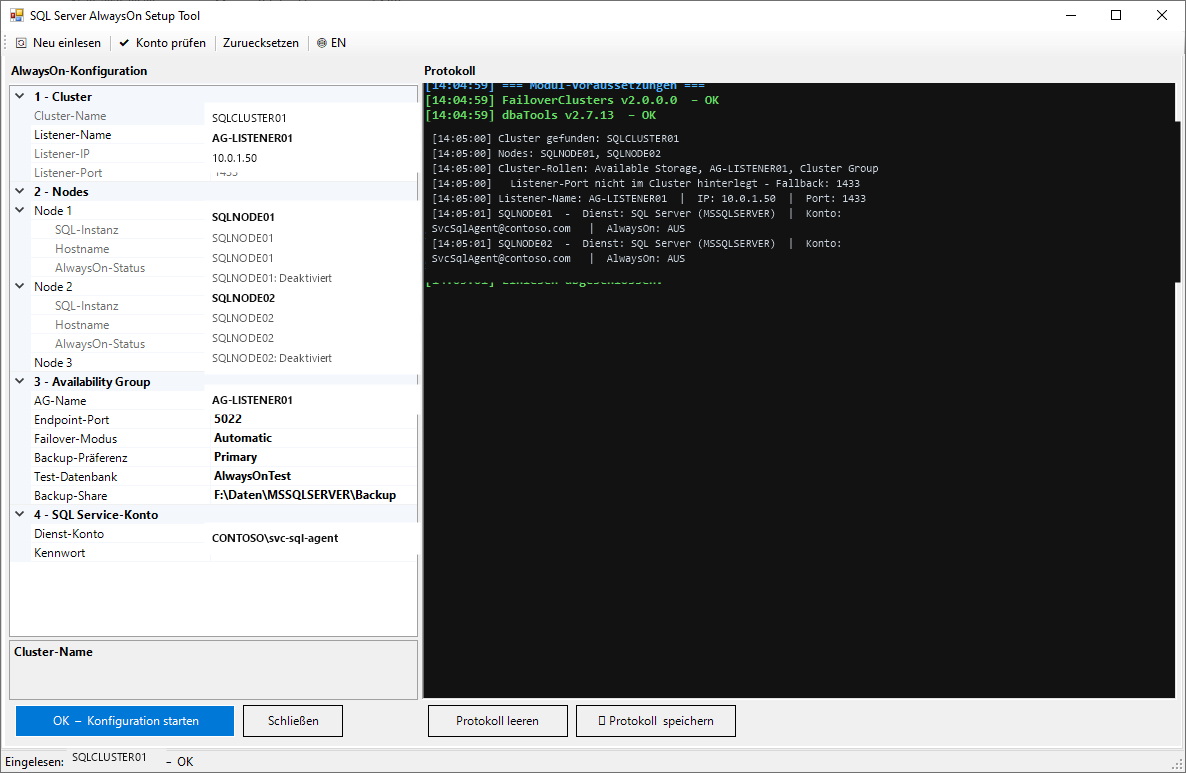
sp_configure 'hadr enabled', 1 on every node; service restart with an active readiness check.GRANT CONNECT ON ENDPOINT applied on every node.sqlcmd), replicas joined, automatic seeding enabled.ALTER AVAILABILITY GROUP.Start: open PowerShell as Administrator on a cluster node and run AlwaysOnSetup.ps1. It checks modules and reads cluster information automatically — everything it finds appears in a PropertyGrid for review.
| AG name | Name of the availability group (= WSFC role name) |
| Listener name | DNS name of the AG listener |
| Listener IP | Listener IP address (taken from the cluster) |
| Listener port | Listener TCP port (default: 1433) |
| Endpoint port | HADR endpoint port (default: 5022) |
| Failover mode | Automatic = synchronous with automatic failover; Manual = asynchronous |
| Backup preference | Primary / Secondary / PreferSecondary / None (default: Primary) |
| Test database | Name of the database to add to the AG |
| Backup share | UNC path for the initial full backup |
| Service account | SQL service account (auto-detected, optionally changeable) |
Service Principal Names let SQL Server use Kerberos authentication. If they're missing, Windows authentication fails with Cannot generate SSPI context.
| Situation | What happens |
|---|---|
| SPNs already set | Fully automatic run, Kerberos on every node, no manual step |
| SPNs missing | Tool pauses → shows a ready-to-run T-SQL block → you run it manually → click Continue → the rest of the run continues over SQL authentication |
# Per SQL node — short name and FQDN setspn -S MSSQLSvc/SQLNODE01:1433 DOMAIN\SQLServiceAccount setspn -S MSSQLSvc/SQLNODE01.domain.com:1433 DOMAIN\SQLServiceAccount setspn -S MSSQLSvc/SQLNODE02:1433 DOMAIN\SQLServiceAccount setspn -S MSSQLSvc/SQLNODE02.domain.com:1433 DOMAIN\SQLServiceAccount # AG listener setspn -S MSSQLSvc/AG-LISTENER:1433 DOMAIN\SQLServiceAccount setspn -S MSSQLSvc/AG-LISTENER.domain.com:1433 DOMAIN\SQLServiceAccount # Verify after setting: setspn -L DOMAIN\SQLServiceAccount
Step 9 generates the exact commands for your environment and saves them to C:\System\WinSrvLog\MSSQL\AlwaysOn_SPN_ADTeam_<date>.txt — ready to forward as-is.
All files are written automatically to C:\System\WinSrvLog\MSSQL\.
| File | Contents | When |
|---|---|---|
| AlwaysOn_ClusterSettings_<date>.txt | Cluster configuration, AG parameters, node status — a backup taken before any change | Before step 1 |
| AlwaysOn_Setup_<date>.log | Full text log of every step, timestamped | After completion |
| AlwaysOn_Setup_<date>.rtf | Color RTF log (saved via a button in the tool) | On demand |
| AlwaysOn_SPN_ADTeam_<date>.txt | Ready-to-send setspn commands with explanation and a verification command | Step 9 |
| Error | Cause | Fix |
|---|---|---|
| Cannot generate SSPI context | SPNs for the node are missing in Active Directory | Short term: run the manual SQL-login step in the tool. Long term: have the AD team set the SPNs. |
| WSFC group ... already exists | Leftover from a failed setup attempt | Cleaned up automatically: Remove-ClusterGroup plus the HadrAgNameToldMap registry key on every node. |
| Login failed for user AGSetup_... | SQL Server isn't in mixed mode, or password policy is blocking it | Check mixed mode in SSMS: Server Properties → Security → SQL Server and Windows Authentication mode. |
| Backup directory not reachable | Invalid UNC path, or no write permission | Fix the path in the PropertyGrid; it must be writable from every node. |
| Endpoint port 5022 already in use | Existing endpoint, or a firewall blocking the port | Run SELECT * FROM sys.endpoints WHERE type=4; adjust the port in the PropertyGrid. |
| AG still not visible after 60s | SQL Server hasn't fully initialized after enabling HADR | The tool actively waits via SELECT 1 (up to 2 minutes). On timeout, check the service manually. |
Reading state: Windows auth via WMI for service information, T-SQL for HADR status. Configuring: Windows auth (Kerberos) tested on every node first; on an SSPI error, a temporary SQL login with a cryptographically random 28-character password (RNGCryptoServiceProvider). Cleanup: the temporary login is deleted on every node automatically, and the password policy re-enabled.
CREATE AVAILABILITY GROUP and every AG-join command runs through sqlcmd directly rather than Invoke-DbaQuery. Reason: after the service restart in step 2, dbatools can hold a cached connection where sys.availability_groups still appears empty. sqlcmd opens a fresh TCP connection on every call.
Before creating the AG, the tool checks for a leftover WSFC group from a previous attempt and cleans it up automatically: Stop-ClusterGroup + Remove-ClusterGroup -RemoveResources -Force, then clears the HKLM:\Cluster\HadrAgNameToldMap registry key on every node via Invoke-Command.
The temporary SQL login uses a cryptographically random password built only from T-SQL-safe special characters. The password is never written to a log file — it's visible only in the running session's RTF window. The Enforce Password Policy setting is disabled only for the duration of creating the login, and both the login and the policy are guaranteed to be reset at the end.
AlwaysOnSetup hands off a working availability group. These sqmSQLTool commands are the natural next steps to harden and monitor it.
Invoke-sqmSplunkConfiguration
Sends AG replication status, sync health, and failover events to Splunk.
Invoke-sqmSaObfuscation
Renames the SA account on every node, reducing the default attack surface.
New-sqmSqlCertificate
Secures endpoint encryption with your own SQL Server certificate.