powershelldba.de
REF: PSDB-DBC-2026 SCOPE: SQL Server 2016+ STATUS: v1.0
Module

Two databases. One honest list of what's actually different.

DbSchemaCompare is a Windows desktop tool that compares two live SQL Server databases end to end — tables, columns, indexes, constraints, views, procedures, functions, triggers, and security — and hands you a single HTML report of what's only on one side and what changed. It is strictly read-only: it only ever runs SELECT against system catalog views, never ALTER/CREATE/DROP, against either database.

Why this exists

An ad-hoc comparison script cost a customer an entire (wrong) migration recommendation.

A hand-written comparison built on CHECKSUM_AGG(BINARY_CHECKSUM(column_id, ...)) once flagged 12 out of 200 tables as "definition changed" — including the central 198-column table — because sys.columns.column_id keeps a gap after a column is dropped and re-added, even though the actual structure was identical. That false alarm led to two detailed wrong theories and a recommendation to rebuild a working database from scratch, before the customer's own DBA caught it. DbSchemaCompare exists so that comparison never has to be hand-rolled under time pressure again.

Without itWith DbSchemaCompare
Ad-hoc T-SQL comparison scripts, rebuilt under time pressure each timeOne tested tool, run in minutes against any two databases
Checksums over internal IDs report a dropped-and-readded column as "changed"Every object matched by name and ordinal position — never column_id/object_id/index_id
Auto-named PK/UNIQUE constraints (PK__T1__3214EC07...) look "renamed" on every serverAuto-generated constraint names detected and matched by kind + columns instead
Security drift (an extra DB role, a stray GRANT) goes unnoticed until an auditDB users, roles, memberships, and permissions compared alongside the schema
A vague "I think X changed" claim to a customer's DBAA precise property-level diff: exact field, old value, new value
Requirements

What it needs.

Operating systemWindows 10, Windows 11, or Windows Server 2019 or later
Runtime.NET Framework 4.8 — ships with Windows, nothing to install on a target DBA workstation or jump host
SQL Server2016 or later on both sides
AccessA login that can read the catalog views on both databases — no elevated rights, no writes
DependencyMicrosoft.Data.SqlClient — the only external dependency; no SMO, no ORM

Detection and reporting only — DbSchemaCompare does not generate sync/migration scripts, and it never saves a baseline. Point it at a Source and a Target, get a report. That's the whole tool, deliberately.
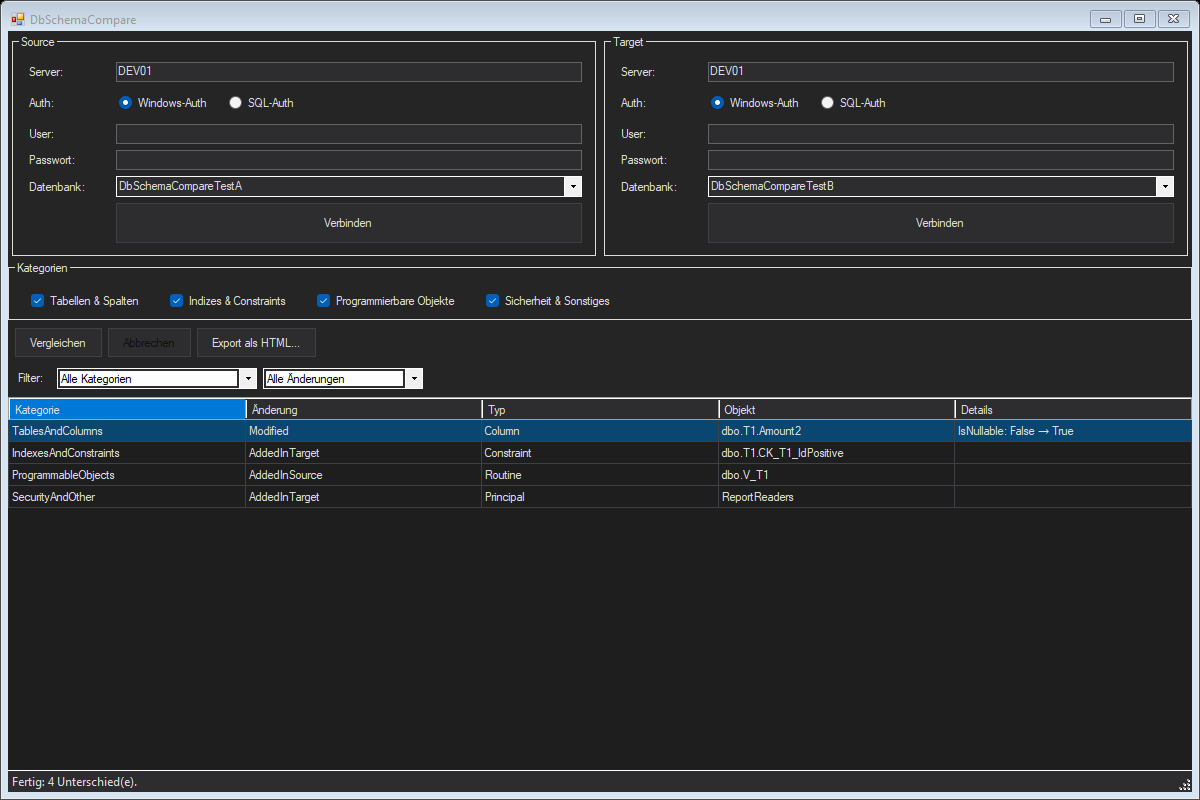
DbSchemaCompare main window comparing two test databases: Source and Target connection panels at the top, four category checkboxes (Tables and Columns, Indexes and Constraints, Programmable Objects, Security and Other) all checked, a results grid showing four differences — a Modified column with an IsNullable change, an index/constraint only in the target, a routine only in the source, and a security principal only in the target — and a status bar reading 'Fertig: 4 Unterschied(e)'
The single-window dashboard: connect Source and Target, pick which categories to compare, run. Four real differences found and grouped by category, each with the exact property that changed.
What it compares

Four categories, every object matched by name.

Every table, index, constraint, routine, and principal is matched between Source and Target by its actual name — schema-qualified, case-insensitive — never by an instance-local identifier. Nothing in this list is a checksum or aggregate signature; every property is compared individually so a finding says exactly what changed, not just that "something" did.

CategoryWhat's compared
Tables & ColumnsColumn data type, length/precision/scale, nullability, identity, default, computed definition, ordinal position, extended properties, partitioning
Indexes & ConstraintsUnique/clustered/primary-key flags, key and included columns, filter predicate; PK/Unique/Foreign Key/Check constraints incl. referenced table/columns and delete/update actions
Programmable ObjectsViews, stored procedures, scalar & table-valued functions, triggers — definition text compared verbatim (whitespace-normalized)
Security & OtherDatabase users and roles, login mapping, role memberships, and permission grants — matched by principal name, not principal_id

Every finding is one of three kinds: only in Source, only in Target, or Modified with the exact list of properties that differ — old value on the left, new value on the right.

Built to avoid false alarms

Two ID-based traps, closed by design.

SQL Server exposes several identifiers that look like they identify an object stably, but are actually instance-local — they mean nothing when comparing two different databases, even two copies of the exact same schema.

column_idKeeps a gap after a column is dropped and re-added. A table with identical columns, types, and order on both sides can still show a different column_id sequence. DbSchemaCompare uses ROW_NUMBER() OVER (PARTITION BY object_id ORDER BY column_id) as the ordinal position instead — reconstructed at read time, never leaked into a comparison key.
Auto PK namesAn unnamed PK/UNIQUE constraint gets a generated name like PK__T1__3214EC078C8AE89F — the hex suffix is an internal hash that differs between two servers even for a byte-for-byte identical constraint. Detected via pattern match and matched by kind + columns instead of the literal name.

Both cases are regression-tested against a live SQL Server: two structurally identical tables built with these exact traps report zero differences.

Output

One self-contained HTML report.

Export writes a dark-theme HTML file with a summary table (counts per category and change type) followed by a detail table per category — object type, change, and every differing property with its old and new value. No server round-trip, no external assets; open it anywhere and send it as-is.

Automation

Headless for CI and screenshots alike.

The same engine that drives the GUI runs from the command line — for a build pipeline gate, a scheduled drift check, or generating a report as a pipeline artifact.

DbSchemaCompare.exe --compare <srcServer> <srcDb> <tgtServer> <tgtDb>
    [--srcsqlauth <user> <pass>] [--tgtsqlauth <user> <pass>] [--report <file.html>]   # headless compare, optional report
Technical details

Why it's built this way.

Read-only by design

Every database interaction is a SELECT against a catalog view. The tool never issues DDL or DML against either database, and never stores a password — SQL-authenticated connections re-enter the password each session.

.NET Framework 4.8, on purpose

Target machines are DBA workstations and jump hosts that don't reliably have a modern .NET desktop runtime. .NET Framework 4.8 ships with Windows, so deployment is a folder copy — no installer, no runtime prerequisite.

No sync scripts, no baselines, on purpose

DbSchemaCompare only detects and reports. A DDL generator per object type, or a saved-snapshot/baseline mode, are both real features — but each is a separate, riskier scope. This first version stays small and gets the comparison itself right.

Next steps

Point it at two databases today.

No installer, no configuration file — connect Source and Target, pick categories, compare.