Ola Hallengren DatabaseBackup
clicked together, checked before it runs
Every parameter has a field and a help text, the combination is validated while you click, and the result is a finished command or a complete SQL Agent job.
75
parameters, release 2026-06-29
100+
validation rules
4
output formats
0
module dependencies
Preset
→
Parameters
→
Live validation
→
Dry run on the server
→
Agent job
The error message arrives at 2 a.m., in the job history
By hand
- 75 parameter names copied from the documentation page
- Many exclude each other:
@URLvs.@Directory,@Databasesvs.@AvailabilityGroups - Some only for LOG or DIFF, some only for LiteSpeed, SQL Backup, SQLsafe, Data Domain Boost
- Mistakes show up in the first scheduled run
- Agent job and schedule clicked together separately in SSMS
With sqmOlaBackupBuilder
- One field per parameter, type, default and help shown
- Errors and hints listed live, double-click jumps to the field
- Only set parameters are written, the rest keeps Ola's default
- Dry run with
@Execute = 'N': Ola itself confirms the call - Job script with schedule, or the job created directly
What the job history usually says
Msg 50000, Level 16: The value for the parameter @CleanupTime is not supported.
Categories left, the finished command right
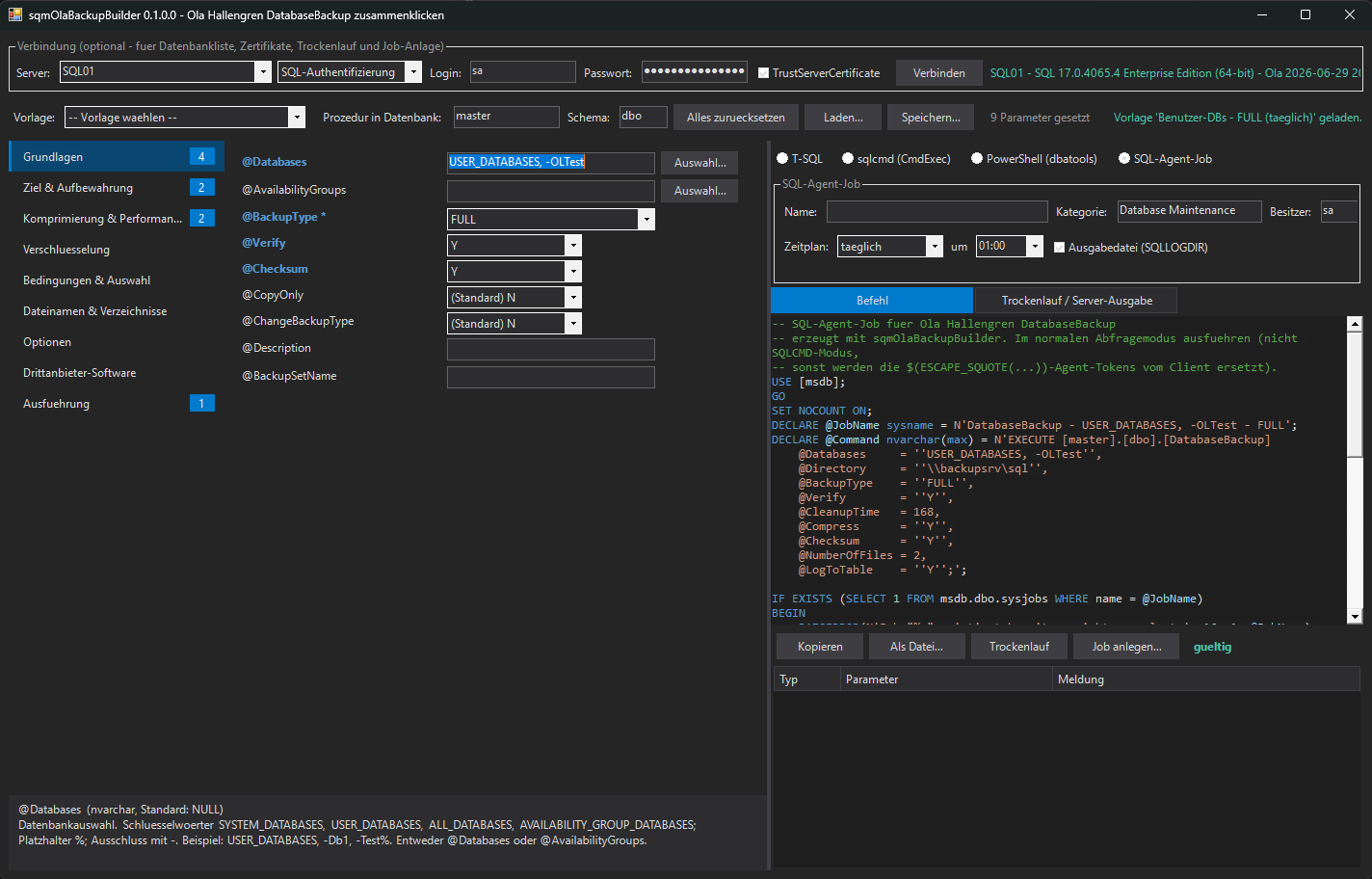
1Categories: nine groups, the badge counts the parameters set
2Fields: drop-downs, pickers for databases, AGs and folders, token menu for file names
3Help: type, default and explanation of the focused field
4Output: regenerated on every change, VS-style syntax highlighting
Visual Studio dark theme, same as the other powershelldba.de tools
All 75 parameters, grouped by what you want to decide
| Category | Parameters (examples) |
|---|---|
| Basics | @Databases, @AvailabilityGroups, @BackupType, @Verify, @Checksum, @CopyOnly, @ChangeBackupType |
| Target & retention | @Directory, @CleanupTime, @MirrorDirectory, @URL, @Credential, @BackupOptions |
| Compression & performance | @Compress, @CompressionAlgorithm (ZSTD), @BufferCount, @MaxTransferSize, @NumberOfFiles |
| Encryption | @Encrypt, @EncryptionAlgorithm, @ServerCertificate, @ServerAsymmetricKey |
| Conditions | @Updateability, @MinModificationLevel, @MinLogSizeSinceLastLogBackup, @OverrideBackupPreference |
| File names & directories | @DirectoryStructure, @FileName, AG variants, case, @TokenTimezone, extensions |
| Options / third-party / execution | @Init, @NoRecovery, @Stats, @BackupSoftware, Data Domain Boost, @DatabasesInParallel, @LogToTable |
"(Standard)" or empty means: not written, Ola's default applies.
Start from a sensible job, then adjust
| Preset | Contents | Schedule |
|---|---|---|
| User DBs - FULL | USER_DATABASES, Verify, Checksum, Compress, CleanupTime 168, LogToTable | daily |
| User DBs - DIFF | as FULL, DIFF with ChangeBackupType | |
| User DBs - LOG | LOG with ChangeBackupType | every 15 min |
| System DBs - FULL | SYSTEM_DATABASES | daily |
| Ad-hoc COPY_ONLY | FULL COPY_ONLY, no cleanup, pick the database | |
| Large DB - striping | 4 files, BufferCount 50, MaxTransferSize 4 MB | |
| Dry run | Execute = N, only prints the commands |
✓ A preset keeps the target directory or URL you already entered.
The procedure's own rules, checked while you click
Errors: Ola would refuse the call
@CleanupTimetogether with@URL@Init = 'Y'or@Format = 'Y'on a LOG backup@NumberOfFiles = 3with two directories@MaxTransferSizenot a multiple of 64 KB- Native encryption without certificate or asymmetric key
@Threads/@Throttlewithout third-party software- File name without
{FileNumber}for several files
Hints: allowed, rarely intended
- No
@CleanupTime: old files are never deleted @LogToTable = 'N': no history in dbo.CommandLog@NoRecovery = 'Y': databases end up RESTORING- ZSTD / CompressionLevel need SQL Server 2025
@EncryptionKeystands in plain text in the job
Validation list
Error Init Not for LOG.
Hint CleanupTime No CleanupTime: old backup files are never deleted.
Hint CleanupTime No CleanupTime: old backup files are never deleted.
Four formats from one set of parameters
EXECUTE [master].[dbo].[DatabaseBackup]
    @Databases     = 'USER_DATABASES, -Test%',
    @Directory     = '\\backupsrv\sql',
    @BackupType    = 'FULL',
    @Verify        = 'Y',
    @CleanupTime   = 168,
    @Checksum      = 'Y',
    @NumberOfFiles = 2,
@LogToTable = 'Y';| Format | Result |
|---|---|
| T-SQL | Aligned EXECUTE, parameters in the order of the procedure |
| sqlcmd | One line like Ola's CmdExec job steps, $(ESCAPE_SQUOTE(SRVR)) token |
| PowerShell | Invoke-DbaQuery ... -QueryTimeout 0 -EnableException |
| Agent job | Category, owner, T-SQL step, output file in SQLLOGDIR, daily / weekly / interval schedule |
A complete job script that never overwrites
DECLARE @JobName sysname = N'DatabaseBackup - USER_DATABASES - LOG';
IF EXISTS (SELECT 1 FROM msdb.dbo.sysjobs WHERE name = @JobName)
    BEGIN RAISERROR(N'Job "%s" existiert bereits - nichts angelegt.', 16, 1, @JobName); RETURN; END
BEGIN TRANSACTION;
EXECUTE msdb.dbo.sp_add_job      @job_name = @JobName, @category_name = N'Database Maintenance', ...
EXECUTE msdb.dbo.sp_add_jobstep  ... @subsystem = N'TSQL', @command = @Command,
     @output_file_name = N'$(ESCAPE_SQUOTE(SQLLOGDIR))\DatabaseBackup_$(ESCAPE_SQUOTE(JOBID))_...txt';
EXECUTE msdb.dbo.sp_add_jobschedule ... @freq_subday_type = 4, @freq_subday_interval = 15;
EXECUTE msdb.dbo.sp_add_jobserver @job_name = @JobName, @server_name = N'(local)';
COMMIT TRANSACTION;
✓ T-SQL step, no PowerShell subsystem
✓ Job name built from selection and type
✓ Existing job: stops, changes nothing
Let Ola confirm the call before it is scheduled
What only the server knows
- Edition and version (ZSTD needs 2025, QAT Standard / Enterprise)
- Does the backup directory exist?
- Do certificate, asymmetric key and credential exist?
- Is the third-party backup software installed?
How it works
- Command sent with
@Execute = 'N' - Ola checks every parameter and prints the BACKUP, VERIFY and cleanup commands
- Nothing is backed up, nothing deleted
- Errors red in the server output
Server output (dry run against SQL Server 2025)
Version: 2026-06-29 20:49:12
Msg 50000, Level 16: The directory /var/opt/mssql/backup does not exist.
Msg 50000, Level 16: The value for the parameter @ServerCertificate is not supported.
Msg 50000, Level 16: The directory /var/opt/mssql/backup does not exist.
Msg 50000, Level 16: The value for the parameter @ServerCertificate is not supported.
Optional, but it fills the drop-downs
Connect (Windows / SQL auth)
→
SQL version, edition, Ola version
→
Lists filled
→
Dry run / create job
Database picker
Keywords (USER_DATABASES, ALL_DATABASES, ...), include list, exclude list (-Name), wildcard patterns.
Security objects
Certificates, asymmetric keys and credentials of the instance as drop-downs, still freely editable.
Version check
An Ola installation older than 2026-06-29 is flagged: newer parameters are unknown there.
Without a connection the command can still be built completely. SqlClient only, no dbatools needed.
Same generator without the GUI
$p = @{ Databases = 'USER_DATABASES'; BackupType = 'LOG'; ChangeBackupType = 'Y'
        CleanupTime = 168; LogToTable = 'Y' }
Test-sqmOlaBackupParameter -Parameter $p                     # offline rule check
New-sqmOlaBackupCommand    -Parameter $p -Format AgentJob `
    -ScheduleType Interval -IntervalMinutes 15 -JobOutputFile

# new Ola release? compare parameter list and order first
.\Tests\Test-sqmOlaBackupBuilder.ps1 -MaintenanceSolution .\MaintenanceSolution.sql -SqlInstance SQL01| Function | Purpose |
|---|---|
| Show-sqmOlaBackupGui | The GUI, optionally connected right away |
| New-sqmOlaBackupCommand | T-SQL, sqlcmd, PowerShell or Agent job from a hashtable |
| Test-sqmOlaBackupParameter | Errors and hints per parameter, offline |
Pick a preset, adjust, dry run, schedule
75
parameters
100+
rules
4
formats
0
dependencies
✓ Every parameter with help, only set ones written
✓ Live validation with jump to the field
✓ Presets for the standard backup jobs
✓ Live validation with jump to the field
✓ Presets for the standard backup jobs
✓ Dry run with @Execute = 'N'
✓ Agent job script or direct creation, never overwrites
✓ PowerShell 5.1 and 7, Visual Studio dark theme
✓ Agent job script or direct creation, never overwrites
✓ PowerShell 5.1 and 7, Visual Studio dark theme