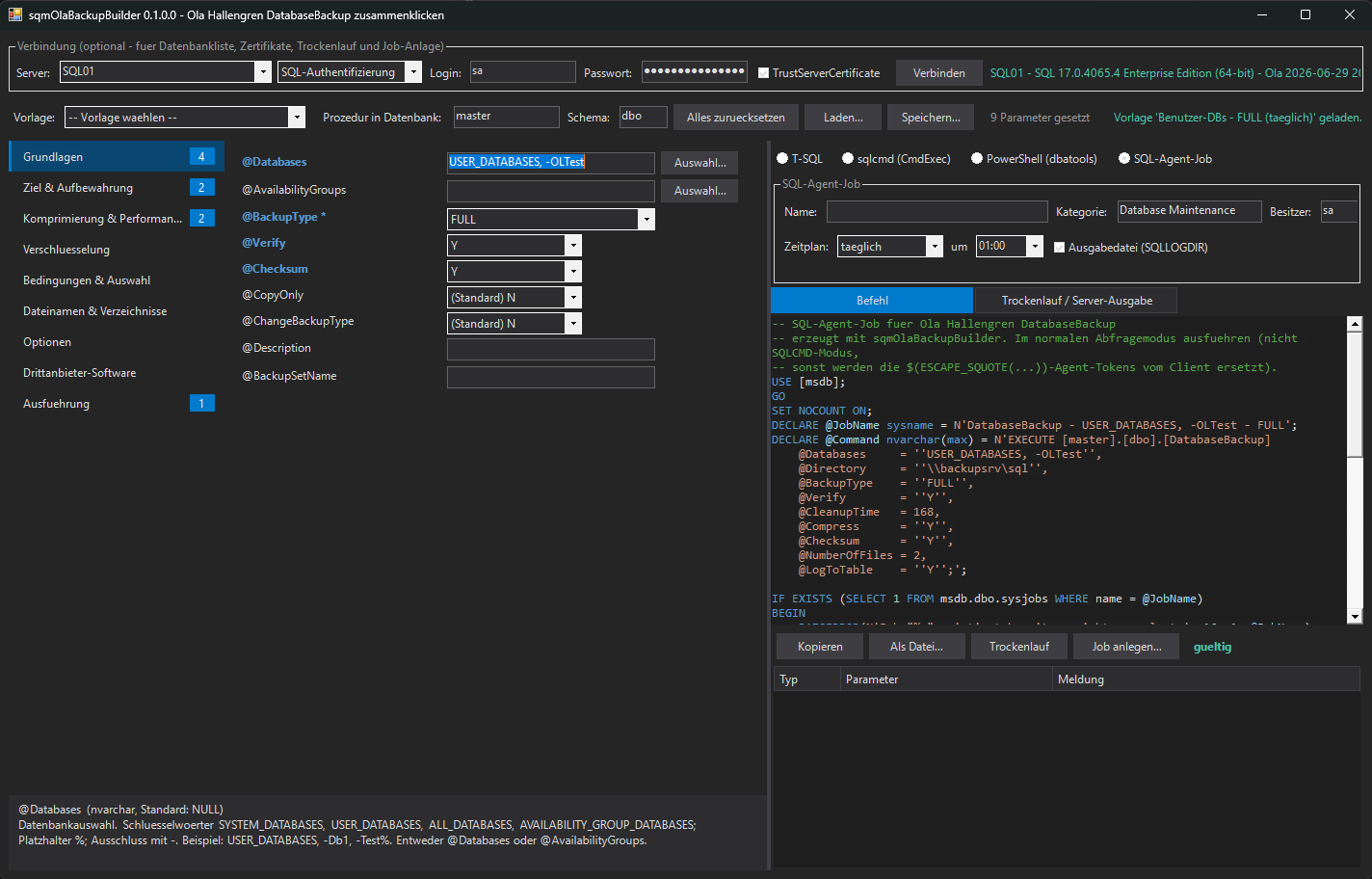
sqmOlaBackupBuilder is a PowerShell module with a WinForms GUI for Ola Hallengren's dbo.DatabaseBackup. Every parameter of the current release has its own field and help text, the combination is validated live against the same rules the procedure enforces, and the result comes out as T-SQL, a sqlcmd line, PowerShell or a complete SQL Agent job with schedule. Connected to an instance, it runs a dry run with @Execute = 'N' so Ola itself confirms the call. No dbatools or other module dependency.
DatabaseBackup has 75 parameters. Many exclude each other, some only apply to LOG or DIFF, others only to LiteSpeed, SQL Backup, SQLsafe or Data Domain Boost. Get one wrong and the procedure refuses with "The value for the parameter ... is not supported", usually during the first scheduled run. sqmOlaBackupBuilder moves that moment to the second you click.
| By hand | With sqmOlaBackupBuilder |
|---|---|
| Parameter names copied from the documentation page, one typo per job | Every parameter is a field with its type, default and help text |
@CleanupTime with @URL, @Init = 'Y' on a log backup, found by the first failed run | Live list of errors and hints, double-click jumps to the field |
@NumberOfFiles = 4 with a file name that has no {FileNumber} | Token menu for directory and file name patterns, checked on every change |
| Agent job built by hand in SSMS, schedule clicked separately | Complete job script with category, owner, output file and daily, weekly or interval schedule |
| "Does the certificate exist? Is ZSTD available on this version?" | Dry run with @Execute = 'N': Ola checks the server side rules and prints the BACKUP commands |
| PowerShell | Windows PowerShell 5.1 or PowerShell 7 on Windows (the GUI is WinForms), both verified |
| Modules | None. The optional connection uses System.Data.SqlClient, so it runs on locked-down servers without PSGallery access. The PowerShell output format calls dbatools' Invoke-DbaQuery on the system where you run it |
| Ola Hallengren | SQL Server Maintenance Solution on the target instance. Parameters match the release 2026-06-29; an older installation is detected and flagged |
| SQL Server | Whatever Ola supports; tested against SQL Server 2025 (CU7) |
| Rights | Building the command needs no connection at all. Dry run and job creation run with your login, use one that may run Ola's backups and create Agent jobs (typically sysadmin; the job owner defaults to sa) |
Show-sqmOlaBackupGui uses the Visual Studio dark theme of the other powershelldba.de tools. Only parameters you actually set end up in the command; everything left at (Standard) keeps Ola's default.
@DirectoryStructure and @FileName.@EncryptionKey is never saved).
More than 100 checks are taken from the parameter block of DatabaseBackup itself. Errors mean Ola would refuse the call; hints flag things that are allowed but rarely intended, such as no @CleanupTime or @LogToTable = 'N'.
| Area | Examples |
|---|---|
| Selection | Exactly one of @Databases and @AvailabilityGroups; @BackupType mandatory |
| Target | @URL excludes @Directory, @MirrorDirectory and third-party software; no @CleanupTime with URL; same number of mirror directories |
| Value ranges | @NumberOfFiles 1 to 64 and divisible by the number of targets, @MaxTransferSize in 64 KB steps up to 20 MB, @BlockSize list, @Stats 1 to 100 |
| Backup type | @NoRecovery and @MinLogSizeSinceLastLogBackup only for LOG; @Init, @Format, @ReadWriteFileGroups never for LOG; @MinModificationLevel only DIFF with @ChangeBackupType = 'Y' |
| Encryption | Algorithm per backup software, native needs a certificate or an asymmetric key, @EncryptionKey only for third-party software |
| Third-party | @Threads, @Throttle, @AdaptiveCompression, @ExpireDate, @RetainDays, Data Domain Boost mandatory fields |
| File names | Must end with .{FileExtension}, no path separators, {FileNumber} with several files, unknown tokens, {DatabaseName} and {BackupType} in the directory structure when cleaning up |
EXECUTE [master].[dbo].[DatabaseBackup] @Databases = 'USER_DATABASES, -Test%', @Directory = '\\backupsrv\sql', @BackupType = 'FULL', @Verify = 'Y', @CleanupTime = 168, @Compress = 'Y', @Checksum = 'Y', @NumberOfFiles = 2, @LogToTable = 'Y';
| Format | Use |
|---|---|
| T-SQL | Aligned EXECUTE, parameters in the order of the procedure |
| sqlcmd (CmdExec) | One line in the style of Ola's own job steps, with the Agent token $(ESCAPE_SQUOTE(SRVR)) when not connected |
| PowerShell | Invoke-DbaQuery ... -QueryTimeout 0 -MessagesToOutput -EnableException |
| SQL Agent job | Complete script: category, owner, T-SQL step, optional output file in SQLLOGDIR, daily, weekly or interval schedule. Stops with a message if a job of that name exists |
Some rules depend on the server: edition, version (ZSTD needs SQL Server 2025, QAT Standard or Enterprise), existing directories, certificates, credentials, installed backup software. The dry run sends the command with @Execute = 'N'; Ola then checks everything and only prints the BACKUP, VERIFY and cleanup commands it would run. Nothing is backed up.
| Function | Purpose |
|---|---|
| Show-sqmOlaBackupGui | The WinForms GUI, optionally connected right away with -SqlInstance / -SqlCredential |
| New-sqmOlaBackupCommand | Builds T-SQL, sqlcmd, PowerShell or an Agent job script from a hashtable, no connection needed |
| Test-sqmOlaBackupParameter | Offline rule check, returns errors and warnings per parameter |
# Installation - AllUsers when elevated, otherwise CurrentUser Install.cmd # GUI (or double-click Start-sqmOlaBackupBuilder.cmd without installing) Show-sqmOlaBackupGui -SqlInstance SQL01 # Log backup every 15 minutes as an Agent job $p = @{ Databases = 'USER_DATABASES'; BackupType = 'LOG'; ChangeBackupType = 'Y'; CleanupTime = 168; LogToTable = 'Y' } Test-sqmOlaBackupParameter -Parameter $p New-sqmOlaBackupCommand -Parameter $p -Format AgentJob -ScheduleType Interval -IntervalMinutes 15 -JobOutputFile
The last servers and the login name are remembered in %APPDATA%\sqmOlaBackupBuilder\config.json; the password never is. Tests\Test-sqmOlaBackupBuilder.ps1 -MaintenanceSolution MaintenanceSolution.sql compares the parameter list with a new Ola release, so new parameters show up immediately.
No dependencies to install: unzip, double-click Start-sqmOlaBackupBuilder.cmd, pick a preset.
PowerShell source, MIT-licensed. Clone or download the ZIP and run Install.cmd.
GUI walkthrough, presets, every validation rule, output formats, dry run, scripting. Markdown source also on GitHub.
Installs the Maintenance Solution, creates the standard backup jobs and checks the installation.
The reference for every DatabaseBackup parameter, by the author of the Maintenance Solution.
Twelve slides: the problem, the GUI, presets, validation, output formats, Agent job and dry run.
Get in touch about the module, a feature, or the wider powershelldba.de toolchain.