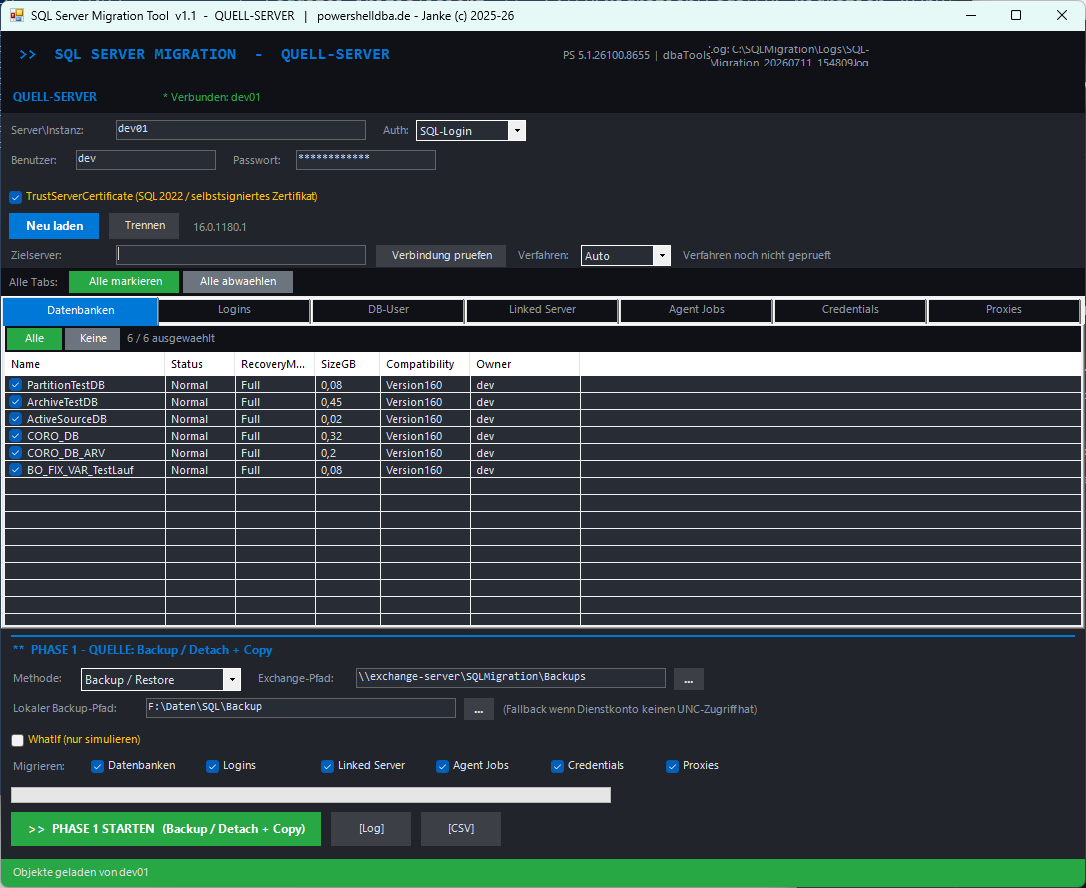
SQLMigration is a WinForms tool for SQL Server database migration. When source and target can reach each other directly, it runs in one pass. When they can't — separate domains, no shared network — it splits into two phases connected only by a state file on a shared exchange path. Databases, logins, DB users, linked servers, agent jobs, credentials, and proxies all migrate in both modes.
A connectivity check against the other server decides which path to use — or you override it explicitly via Auto / Direct / TwoPhase.
| Direct | TwoPhase (Umweg) |
|---|---|
| Source and target reachable at the same time | Source and target separated — different domains, no shared network |
| One pass, run from the source server | Phase 1 on source, phase 2 on target, connected only by a state file |
Objects copied directly via Copy-Dba* | Objects exported to script, then imported via Invoke-DbaQuery |
| Backup taken locally, then robocopied straight into the target's admin share | Backup and scripts land on a shared exchange path (UNC) both sides can reach |
In TwoPhase mode, logins export via Export-DbaLogin as a CREATE LOGIN script — including SID and password hash — because Copy-DbaLogin needs both servers visible at once. Agent jobs, linked servers, credentials, and proxies export the same way via Export-Dba*/Export-DbaScript, importing in this order: credentials → proxies → linked servers → agent jobs.
The source database stays online throughout. Recommended for almost everything.
The source database goes offline for the move. Optional re-attach on the source afterward, if you need to keep it around.
What migrates, in both modes: databases, logins, DB users, linked servers, agent jobs, credentials, and proxies. Credential and linked-server secrets aren't always decryptable — the tool writes a TODO list of exactly which ones need to be re-entered by hand on the target.
dbatools ≥ 2.0 installed on both.sysadmin on both SQL instances for the account running it.TrustServerCertificate enabled.Start-SQLMigration.cmd as Administrator, select the Source role.Standard strategy: the backup is written first to the server's own local default backup directory (where the SQL service account always has write access), then robocopied to the exchange path — the copy itself runs in the admin context, so the service account never needs UNC access. The local copy stays on the source as a byproduct.
| Login migration | If Mixed Mode isn't already on and SQL logins are among the imported ones, Mixed Mode is enabled and the SQL service restarted before import — existing connections to the target drop briefly. New_Password_Policy is disabled for the import and re-enabled after. |
| Orphaned DB users | Repaired via Repair-DbaDbOrphanUser. |
| Database owner | Set to sa, resolved by SID 0x01 — works even if sa has been renamed. |
| Orphaned AD logins | Removed, but only when the Logins object type is checked, only Windows logins with a domain SID, never system or sysadmin logins, and only when AD positively fails to resolve the SID (a domain-controller hiccup skips the cleanup rather than risk deleting something valid). |
DBCC CHECKDB clean.sa (set automatically) — spot-check.New_Password_Policy active again (re-enabled automatically after import) — spot-check.| Before restore/attach | Nothing has changed yet on the target — just stop. |
| Backup/Restore method | The source was never touched and stays online — rollback is simply leaving the application on the source. |
| Detach/Attach method | The source was detached — reattach it (via the Re-Attach option, or manually) to put it back. |
| Worst case | Restore the independent full backup taken before the migration started. |
| Symptom | Cause / fix |
|---|---|
| "dbatools is not installed" | Run Install-Module dbatools. |
| Connection or certificate error | Enable TrustServerCertificate; check server/instance, port, firewall. |
| "Exchange path not reachable" | Check the UNC path and permissions; fall back to the local backup path if needed. |
| Backup gets created locally | That's by design — local backup, then robocopy to the share in the admin context. The local copy stays in the server's backup directory. |
| Robocopy error (exit code ≥ 8) | Check the target/source path and the running admin's permissions; check disk space. |
| Phase 2 finds no state file | Phase 1 didn't complete successfully, or the exchange path doesn't match. |
| Orphaned users after restore | Repaired automatically in Phase 2; re-run Repair-DbaDbOrphanUser if needed. |
| An AD login was wrongly kept or removed | Cleanup only deletes when the domain SID positively fails to resolve; a DC hiccup skips it (log: "AD check skipped"). |
| Logins missing after TwoPhase | Check migration_logins.sql on the exchange path; individual batches can fail (log category "LOGIN-IMPORT"). Windows logins from foreign domains can't be created this way. |
| Jobs / linked servers / credentials / proxies missing after TwoPhase | Check the export/import scripts on the exchange path (migration_jobs.sql, migration_linkedservers.sql, migration_credentials.sql, migration_proxies.sql); log categories *-EXPORT (phase 1) and CRED-/PROXY-/LS-/JOB-IMPORT (phase 2). Fill in secrets from the TODO list for credentials/linked servers. |
Log: C:\SQLMigration\Logs\SQL-Migration_*.log, or the [Log] button in the GUI. CSV trail via the [CSV] button. Local backup files are not deleted automatically — clean them up by hand after acceptance. Remove _migration_state.json from the exchange path once you're done, before starting a new migration — otherwise the next run will wrongly detect Target mode.
Once the migration is signed off, these sqmSQLTool commands cover the checks worth running on the new home for these databases.
Get-sqmSQLInstanceCheck
Confirms the target instance is healthy and configured to standard after the migration.
Invoke-sqmLoginAudit
Reviews sysadmin membership and login state after a batch of logins just moved servers.
Invoke-sqmInstanceInventory
Records the new instance's configuration as the current baseline.