sqmDataCompare compares the contents of identically named tables in two live SQL Server databases and tells you which rows exist only on one side and which rows changed, column by column. It is the data counterpart to DbSchemaCompare. It is read-only against the compared databases and does not pull whole tables over the network: the servers hash the rows, and only differing ranges are read in detail.
After a migration, a restore, or a downgrade the question is always the same: is the data in the target really the data of the source? The usual answers are a COUNT(*) per table, a CHECKSUM_AGG, or an EXCEPT across a linked server. Each of them can be wrong or expensive in a way that only shows up later.
| Without it | With sqmDataCompare |
|---|---|
| Equal row counts are read as "same data" | Counts are shown for orientation only; equality is decided by hashes over every compared column |
CHECKSUM collides and hides a changed row | SHA2-256 per row, 64 bits of it summed per bucket |
NULL, empty string, and the text "NULL" are treated alike | All three stay distinct, as do case and trailing spaces |
EXCEPT over a linked server drags the whole table across the network | One scan per server, only bucket totals travel; detail only for the buckets that differ |
A rowversion or a modified-date column makes every row look changed | rowversion, computed, and generated-always columns are excluded; further columns by name pattern |
| "There are some differences somewhere" | Key, column, source value, target value, for every changed row |
| Operating system | Windows 10, Windows 11, or Windows Server 2019 or later |
| Runtime | .NET Framework 4.8, ships with Windows, nothing to install |
| SQL Server | 2016 or later on both sides |
| Access | SELECT on the compared tables and the catalog views; no writes. The tool creates one session-local temp table in tempdb for the detail step, never an object in the compared database. |
| Dependency | Microsoft.Data.SqlClient, the only external dependency |
Detection and reporting only. sqmDataCompare does not generate sync scripts and does not store baselines.
| Stage | What happens |
|---|---|
| 1. Metadata | Row estimate and size from sys.dm_db_partition_stats, key detection (primary key, otherwise unique index). Cheap, shown before anything is read. |
| 2. Bucket hash | One scan per side, in parallel. Every row is hashed on the server (SHA2-256 over a canonical text form of each column) and assigned to one of up to 65,536 buckets by the hash of its key. Per bucket, the row count and the sum of 64-bit row hashes are compared. All buckets equal means the table is identical. |
| 3. Detail | Only for differing buckets, one more scan per side with column values. Rows are paired by key and compared column by column. No sorted merge, so differences in collation or sort order between the servers cannot cause false differences. |
Tables without a key are compared as multisets of row hashes: the report states how many rows exist only in Source or only in Target and shows examples, but cannot pair them. You can give any table a key by hand, and a WHERE condition that applies to both sides.
column_id. Columns that exist on one side only, or have a different base type, are not compared and are listed as notes, so a partial comparison is never presented as a full one.decimal columns with different scale on the two sides are normalized to the larger scale. Trailing spaces count for varchar, fixed-width padding of char does not.These cases are covered by tests against a live SQL Server: changed, missing, and extra rows, NULL against empty string, case and trailing-space differences, rowversion, different database collations, decimal scale, an extra column on one side, composite keys, a table without a key, hierarchyid and geography, and 200,000 rows with three changes.
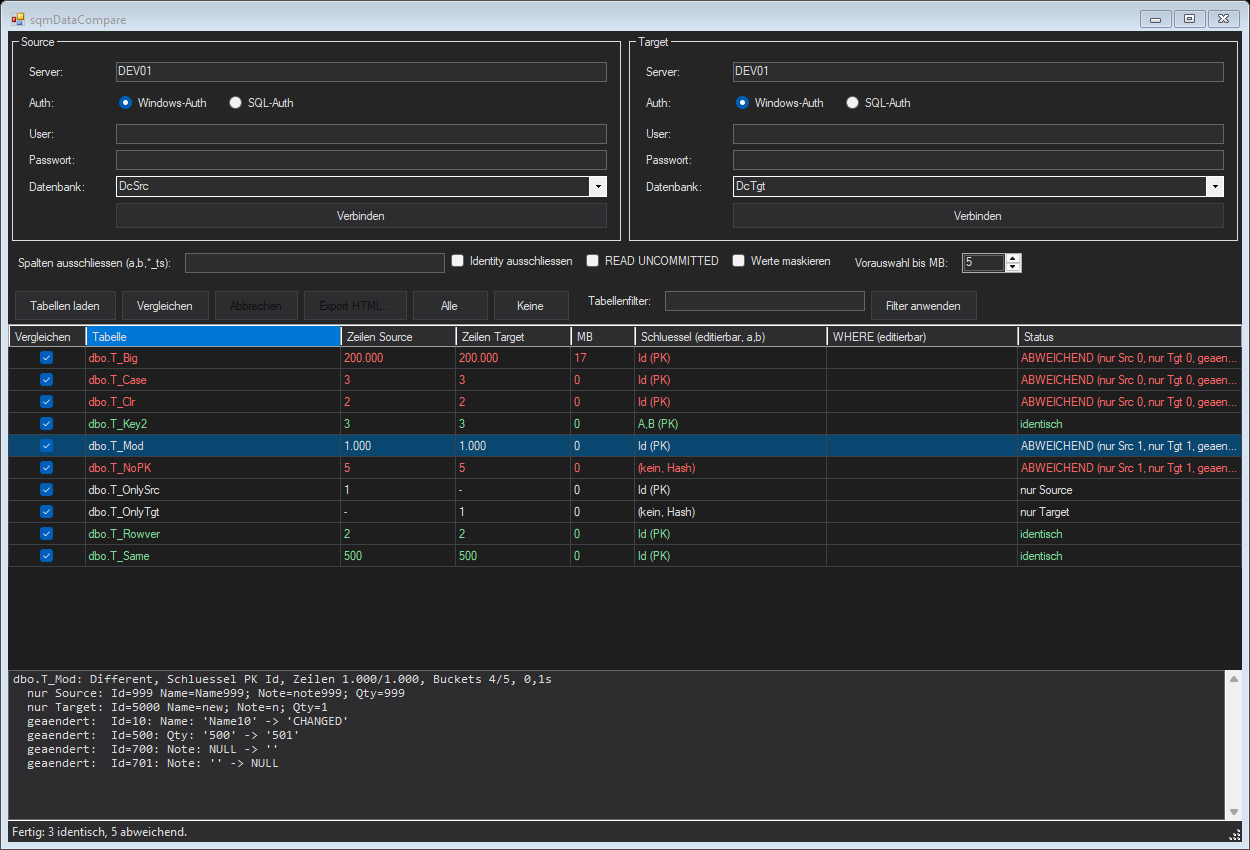
That is real CPU and IO on a production system, so the tool makes the cost visible before it starts: rows and size per table, tables above a size threshold are not preselected, and a warning appears from 1 GB in total. A comparison can be cancelled at any time, READ UNCOMMITTED is optional, and a command timeout applies. In a lab run, 200,000 rows with three columns took about five seconds per table, roughly 40,000 rows per second and side, with both sides running in parallel.
If more than 500,000 rows per side would have to be read for the detail step, the detail is skipped and the report states how many buckets and rows are affected.
You choose the scope at export time: ticked tables, all tables (the ones not compared are listed as skipped), the tables left visible by the filter, or the highlighted rows. On the command line, --report-all adds the unselected tables. A summary per status, a table with rows, key, and counts per table, and a detail section per differing table: rows only in Source, rows only in Target, and changed rows with column, source value, and target value. The report contains data values and says so at the top. With value masking switched on, it contains short hashes instead of values and can be shared more freely.
The same engine runs from the command line. The exit code is 0 when all compared tables are identical and 1 on any difference, error, or incompatible schema.
sqmDataCompare.exe --compare <srcServer> <srcDb> <tgtServer> <tgtDb> [--srcsqlauth <user> <pass>] [--tgtsqlauth <user> <pass>] [--tables a,b,Schema.*] [--all] [--max-rows <n>] [--exclude-cols a,b,*_ts] [--exclude-identity] [--float-digits <n>] [--key Schema.Table=col1+col2] [--where Schema.Table=<condition>] [--read-uncommitted] [--mask] [--report <file.html>] [--report-all]
No sync or repair script and no baselines. float and real are compared exactly unless a rounding is given. A column whose base type differs between the two sides is not compared. Memory-optimized tables are untested. The scope is deliberately the comparison itself.
No installer and no configuration file: connect Source and Target, load the tables, compare.
A Windows executable. Copy the folder, run the exe. Read-only against your databases.
The structural counterpart: tables, columns, indexes, constraints, programmable objects, and security.
Every release, what changed, and why.
Get in touch about the tool, a feature, or the wider powershelldba.de toolchain.