powershelldba.de
REF: PSDB-SSA-2026 SCOPE: SQL Server 2012+ / SSISDB STATUS: v1.1
Module

Your SSIS packages, finally documented — and diffed before you deploy.

SSIS Analyzer is a Windows desktop tool that loads SSIS projects — from an .ispac file, a standalone .dtsx package, or directly from the SSISDB catalog — and shows every element inside them: control flow, data flow, parameters, connections, expressions. It compares two versions of a project field-by-field, traces data lineage across your whole workspace, and exports the result as self-contained HTML documentation.

Why this exists

SSIS packages are a black box until someone opens them.

Most SSIS estates have no dependency map, no lineage record, and no reliable way to know what changed between the version that was built and the version that's actually deployed in the catalog.

Without itWith SSIS Analyzer
No record of what feeds what across dozens of packagesCross-project, end-to-end data lineage
Deploy first, find out what changed laterField-by-field project comparison before deployment
Reading SSIS packages means opening Visual StudioA dedicated viewer with syntax-highlighted SQL and search
Documentation, if it exists, is stale within a sprintSelf-contained HTML export, regenerated on demand
No way to script it into a build pipelineA command-line mode for CI/CD
Requirements

What it needs.

Operating systemWindows 10, Windows 11, or Windows Server 2019 or later
RuntimeSelf-contained .NET 8 build (win-x64) — no separate .NET runtime install required
SQL Server2012 or later, only if you connect to a live SSISDB catalog
Memory / disk4 GB RAM recommended; ~500 MB disk for the install and working files
DependencyMicrosoft.Data.SqlClient — used only for SSISDB catalog connections

This is a standalone Windows desktop application, not a PowerShell module — it doesn't need dbatools or PowerShell to run. It's built by the same author as the rest of this toolchain and is licensed separately: a full-featured 30-day trial, then either a machine-bound license or continued use with watermarked HTML exports.

Getting started

Load a project, or a catalog.

  1. Launch SsisAnalyzer.exeThe first run activates a 30-day full-featured trial automatically — no account, no registration.
  2. Open with an empty workspaceAdd one or more sources from the File menu — see the table below.
  3. Sources persistLoaded sources are remembered and reloaded automatically the next time you start the tool.

Loading projects

ActionWhat it does
AddLoad one or more .ispac project files
DTSXLoad a single .dtsx package, treated as a one-package project
SSISDBLoad a deployed project from the SSIS catalog
RemoveRemove the selected project from the workspace
RefreshReload every source from disk or the catalog

Loading from SSISDB: enter the server, choose Windows or SQL authentication, connect, then pick a folder and project from the catalog tree. The project binary is retrieved through catalog.get_project and parsed exactly like a file — catalog-specific metadata (deployment info, environments, parameter values, references) appears under the project's catalog branch. Passwords are never stored; SQL-authenticated sources ask for the password again the next time you reload.

Exploring a package

Expand a project in the tree: Project → Packages → Package. Every package shows:

PropertiesCreator, creation date, protection level, locale, and more
Parameters, variables, connectionsConnection strings broken down by server, database, and user
ExpressionsEvery SSIS expression in the package, collected in one place
Control flowThe executable/container tree in execution order, including nested containers
Event handlersAttached OnError, OnPreExecute, and similar handlers
Data flow componentsWith their input and output columns

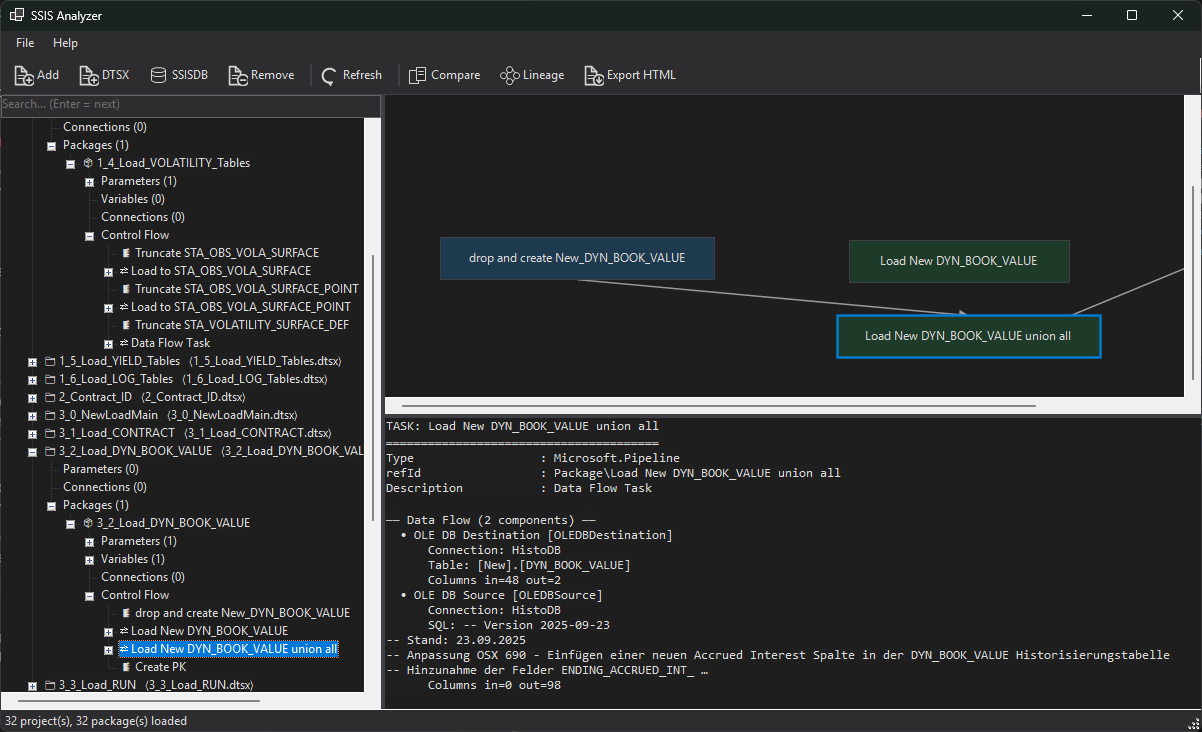
The control-flow panel draws the package or container as boxes and dependency arrows, positioned from the saved layout; clicking a box selects the matching node in the tree. The search box (2+ characters) highlights and expands matches, Enter jumps to the next one, and the match count shows in the status bar. Execute SQL Tasks display their connection, parameter/result bindings, and the SQL itself — automatically formatted and syntax-highlighted.
Compare

See exactly what changed before you deploy it.

File → Compare projects… — pick project A (old) and B (new) from anything already loaded, in any mix of file and SSISDB sources. A common use: load the .ispac build output alongside the deployed SSISDB project, and compare before the deployment goes out.

Diff tree color coding

Green (+)Added
Red (−)Removed
Yellow (~)Changed — real changes shown in bold

SQL changes are shown as a line-by-line diff. Two toggles cut the noise: Differences only, and Hide deployment-only (suppresses fields that only ever differ between a file and a deployed catalog copy, such as ProtectionLevel or the version GUID). Export as HTML… writes the comparison out as a standalone report.

Data lineage

What feeds what, across the whole workspace.

File → Lineage builds lineage across every loaded project at once — cross-project, end to end. Four tabs:

Table flowSource table → target table edges, each labeled with the package/task that creates it
Table explorerPick a table to see its upstream sources and downstream targets (transitively), plus the packages affected by a change to it
Package call graphWhich package calls which, built from Execute Package Tasks
Column linksSource column → target column mappings within each data flow

Column-level lineage is reliable within a single data flow, built from the SSIS lineageId. Table-level lineage sourced from Execute SQL Tasks is heuristic — it's parsed from the SQL text itself, not from a guaranteed metadata source. Export as HTML… from the lineage view produces a report that includes a drawn package-flow diagram.

Output

Self-contained documentation, no server required.

File → Export HTML…, then choose a folder. This generates:

index.htmlAn overview of every loaded project, linking to the workspace-wide lineage report
One page per projectEvery element as tables and forms, formatted/highlighted SQL, an embedded control-flow diagram per package, and an expressions table
lineage.htmlThe workspace-wide lineage report

No external dependencies — open index.html in any browser, on any machine, with no server involved.

Named workspaces

File → Save workspace as… saves the current set of loaded sources to a .ssisws file; File → Open workspace… loads one back. Useful for keeping separate sets — DEV, PROD, a handover package — and the current workspace is also persisted automatically between sessions.

Automation

Scriptable for build pipelines and CI/CD.

The same engine that drives the GUI is available from the command line, for use in build processes and CI/CD pipelines.

SsisAnalyzer.exe --dump    <project.ispac>                  # Console summary of the parse
SsisAnalyzer.exe --export  <project.ispac> [outDir]         # Write the HTML documentation
SsisAnalyzer.exe --compare <a.ispac> <b.ispac> [out.html]   # Write a comparison report
SsisAnalyzer.exe --lineage <project.ispac>                  # Lineage summary + lineage.html
Licensing

Try it fully, then license the machines that keep using it.

Trial30 days from first launch, no features disabled
Status & activationHelp → About / License… shows license status and a Machine ID, with an Install license… button
Getting a licenseSend the Machine ID shown in that dialog to get a machine-bound .lic file, then install it from the same dialog
After the trial, unlicensedThe app keeps working, but HTML exports carry an "UNLICENSED EVALUATION COPY" watermark
Technical details

Why it's built this way.

Interface

A Visual Studio-style dark theme runs throughout — title bar, menus, toolbar, tree, tabs, and the control-flow diagram — with monochrome toolbar icons. The main window is a project/package tree on the left, the control-flow diagram top-right, and a read-only, syntax-highlighted details pane bottom-right.

Parsing

.ispac files and deployed SSISDB projects are read through the same parser, so a file and its deployed counterpart can be compared like-for-like. SSISDB access uses a single dependency, Microsoft.Data.SqlClient, and nothing else — no PowerShell, no dbatools, no external CLR requirement.

Security

Passwords for SQL-authenticated SSISDB sources are never written to disk; they're re-entered on each session that needs them. Licenses are RSA-signed and verified against an embedded public key — the private signing key never ships with the product.

Next steps

Set up the catalog, then point SSIS Analyzer at it.

SSIS Analyzer reads an SSISDB catalog — it doesn't create one. These are the natural steps before and after using it.