powershelldba.de
REF: PSDB-PART-2026 SCOPE: SQL Server 2016–2022 STATUS: v1.7.0
Module

Automatic SQL Server table partitioning, sqmPartitionTool

Partition existing tables, maintain them automatically (sliding window + retention), and migrate them completely into a separate archive database, with a transparent cutover via a view, so existing application code keeps running unchanged. Built on dbatools and sqmSQLTool.

PowerShell 5.1+ Built on dbatools SQL Server 2016–2022 dtcSoftware © Uwe Janke

What is sqmPartitionTool?

sqmPartitionTool is a PowerShell module by dtcSoftware (author: Uwe Janke) for the full lifecycle of a partitioned SQL Server table: from the one-time conversion of an existing table, through ongoing automatic maintenance (creating new partitions ahead of time, removing old ones after their retention period), to fully migrating an entire table into a separate archive database.

The module is built on dbatools and sqmSQLTool (reusing its logging, configuration, and WinForms theme) and supports numeric and string date-surrogate keys alongside real date columns, as well as composite keys with no single unique column, situations that come up regularly in production databases that have grown organically.

PowerShell 5.1+ dbatools sqmSQLTool ≥ 1.9.2.0 SQL Server 2016–2022

Feature highlights

In-place partitioning

Partition an existing table directly in its source database, including a variant for very large tables with little free disk space.

Sliding-window maintenance

New, empty partitions are created automatically ahead of time, the last partition never fills up.

Automatic retention

Expired partitions are removed automatically, optionally copying them to an archive database first.

Archive-DB migration with cutover

Migrate an entire table month by month into an archive database, ending with a view over the copy, transparent to existing application code.

Composite keys

Up to four columns as a key, plus numeric/string date-surrogate keys (e.g. an INT column formatted as YYYYMMDD).

GUI wizard + CLI

A WinForms wizard for the whole process, every core function also works standalone from the PowerShell console.

A, In-place partitioning

Invoke-sqmTablePartitionConversion , partition an existing table, even with little free disk space

What it does

Converts an existing, non-partitioned table into a partitioned one, pre-flight check, min/max detection, boundary calculation, filegroup creation, and the actual partitioning in one call. Works for heaps and clustered-index tables, including automatically extending the PRIMARY KEY with the partition column when needed. -Method BatchedSwap builds a new, empty partitioned copy for very large tables and moves the data in segments with periodic DBCC SHRINKFILE, instead of one single large operation.

When to use it

A table that has grown large and isn't partitioned needs to be partitioned without downtime risk. -Method BatchedSwap specifically when the disk doesn't have enough free space for a classic single-step conversion.

Common pitfalls

  • A PRIMARY KEY/UNIQUE constraint without the partition column in the key, extending it changes uniqueness semantics and must be confirmed deliberately
  • -Method BatchedSwap currently doesn't support tables with incoming foreign keys or triggers
  • Without enough free disk space, the standard method fails partway through the operation

Benefits

  • Automatically detects the right approach (constraint extension, index rebuild, or table swap)
  • Segment-by-segment migration with shrink, for environments with little free disk space
  • Automatically registers the table for automatic maintenance (scenario B)
# Partition an existing table by month
Invoke-sqmTablePartitionConversion -SqlInstance "SQL01" -Database "Sales" -Schema "dbo" -Table "OrderHistory" -PartitionColumn "OrderDate" -Granularity Month -AllowKeyChange

# Very large table, little free disk space
Invoke-sqmTablePartitionConversion -SqlInstance "SQL01" -Database "Sales" -Schema "dbo" -Table "OrderHistory" -PartitionColumn "OrderDate" -Granularity Month -Method BatchedSwap -DataCompression Page

B, Automatic maintenance

New-sqmPartitionExtendJob , sliding-window extension as a SQL Agent job

What it does

Creates a SQL Agent job that periodically runs sqm_ExtendPartitionWindow (a T-SQL procedure), it reads the registry of all registered tables and creates new, empty partitions within the configured lead time (FutureBufferPeriods). Idempotent: running it multiple times on the same day changes nothing.

When to use it

Set this up once, right after the conversion (scenario A), after that, extension runs automatically forever, without anyone needing to remember before "the last partition" fills up.

Common pitfalls

  • Without this job, the most recently created partition eventually fills up and new rows land in the wrong, last partition
  • Needs rights on msdb to create the SQL Agent job

Benefits

  • Fully automatic, no manual intervention after initial setup
  • Covers every table registered in sqm_PartitionRegistry at once
# Set up the maintenance job for sliding-window extension
New-sqmPartitionExtendJob -SqlInstance "SQL01"

Register-sqmPartitionTable + New-sqmPartitionRetentionJob, automatic retention and archiving

What it does

Registers a table with a retention period (-RetentionValue/-RetentionUnit) and an optional target archive database (-ArchiveEnabled/-ArchiveDatabaseName). New-sqmPartitionRetentionJob then creates the matching SQL Agent job, which removes expired partitions via Invoke-sqmPartitionArchive, optionally only after copying them to the archive database first (SWITCH PARTITION, batch copy, MERGE RANGE).

When to use it

Old partitions should disappear automatically after a set period, either deleted permanently, or copied first to a cheaper or differently-backed-up archive database.

Common pitfalls

  • Without -ArchiveEnabled, expired partitions are deleted permanently, test before using in production
  • Only affects individual partitions of a still-active table as they expire one by one, not the whole table at once (for that, see scenario C)

Benefits

  • Configurable retention in months or years
  • Optional archiving instead of deletion, with no extra manual effort
# Set up retention with archiving instead of deletion
Register-sqmPartitionTable -SqlInstance "SQL01" -Database "Sales" -Schema "dbo" -Table "OrderHistory" -RetentionValue 36 -RetentionUnit Months -ArchiveEnabled -ArchiveDatabaseName "SalesArchive"
New-sqmPartitionRetentionJob -SqlInstance "SQL01"

C, Archive-DB migration with cutover

Invoke-sqmTableArchiveMigration , move an entire table into an archive database, transparently via a view

What it does

Migrates an active table month by month, resumable via an idempotent MERGE batch procedure, into a partitioned copy in a separate archive database. Supports single-column and composite keys (up to four columns), real date columns as well as numeric/string date-surrogate keys (e.g. an INT column formatted as YYYYMMDD). -PurgeSourceAfterArchive reclaims disk space in the source via DBCC SHRINKFILE after each confirmed archived month. -CutoverToArchiveView renames the source table at the end and replaces it with a view over the archive copy, existing application code keeps accessing the same table name, unchanged.

When to use it

An entire, active table needs to move permanently to another database, e.g. a separate archive instance with a different backup/storage profile, without adjusting application code. Also suited to very large tables (hundreds of GB up to TB): progress is visible via Write-Progress and a console line per month, and stopping at any point loses nothing.

Common pitfalls

  • The target archive database must already exist, it isn't created automatically
  • A heap, or a key with more than four columns, needs an explicit -KeyColumn
  • Without an index with the date column as its leading column, every batch potentially scans the entire table, consider a suitable index first for very large tables
  • The renamed original table is never deleted automatically, deliberately, so nothing is lost, but check it manually before deleting it for good

Benefits

  • Fully resumable, a stop (network, maintenance window) loses nothing; running it again picks up exactly where it last committed
  • Transparent cutover via a view, no application code needs to change
  • The archive copy is automatically registered for its own sliding-window maintenance
  • Visible progress for migrations that can take hours to days
# Full migration with space reclaim and cutover
Invoke-sqmTableArchiveMigration -SqlInstance "SQL01" -Database "Sales" -Schema "dbo" -Table "OrderHistory" -ArchiveDatabaseName "SalesArchive" -DateColumn "OrderDate" -AllowKeyChange -PurgeSourceAfterArchive -CutoverToArchiveView

GUI wizard

Show-sqmPartitionToolGui , a WinForms wizard for the whole process

What it does

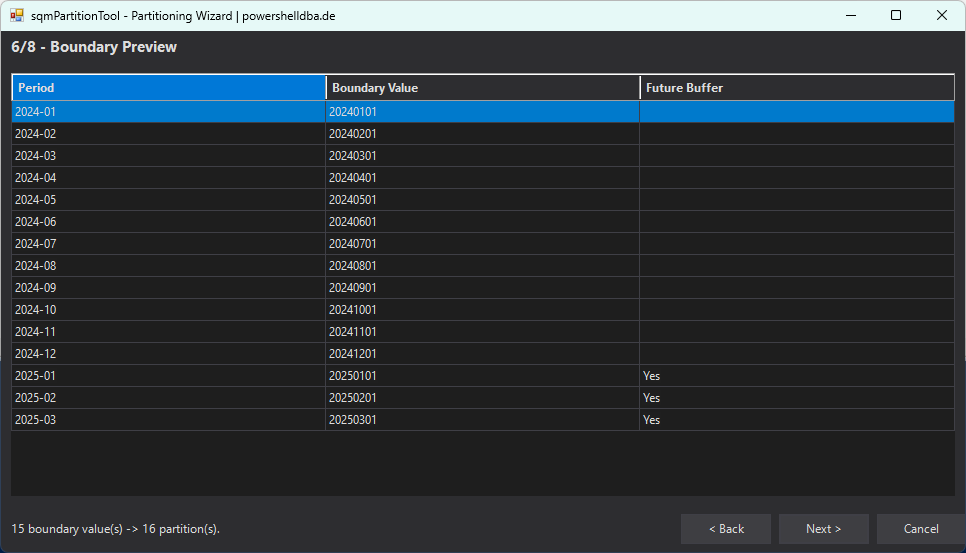
Walks step by step through connection, table selection, column selection, min/max preview, granularity, boundary preview, and execution. Step 6 offers two mutually exclusive modes: immediate migration into an archive database (scenario C), or later automated maintenance in the same database (scenario B). A "Key Column(s)" picker with the table's actual columns only appears when the key can't be derived automatically.

When to use it

For a one-time, interactively guided conversion of a table, with a preview before every critical step. For very long-running migrations (scenario C on very large tables), a direct PowerShell call is a better fit instead, since you don't want to keep the GUI window open for hours.

Common pitfalls

  • WinForms needs the desktop CLR, still available under PowerShell 7 on Windows, but not on PowerShell 7 on Linux/macOS

Benefits

  • Supports both Windows and SQL Server authentication
  • Boundary preview before actual execution, no surprises
  • Live log directly in the window during execution
# Open the GUI wizard
Show-sqmPartitionToolGui -SqlInstance "SQL01"
sqmPartitionTool partitioning wizard, step 6/8 boundary preview with 15 boundary values and 16 partitions, three of them marked as future buffer
Step 6/8 in the partitioning wizard: boundary preview before the actual partitioning, here, 16 monthly partitions, three already created ahead of time as a future buffer.

Quick start

Installation & first steps

# Import the module
Import-Module sqmPartitionTool

# GUI wizard
Show-sqmPartitionToolGui -SqlInstance "SQL01"

# Or directly via CLI: partition an existing table
Invoke-sqmTablePartitionConversion -SqlInstance "SQL01" -Database "Sales" -Schema "dbo" -Table "OrderHistory" -PartitionColumn "OrderDate" -Granularity Month