powershelldba.de
REF: PSDB-SQMDT-2026 SCOPE: SQL Server 2016+ STATUS: Production
Module

Move table data between instances without losing the constraints — or the proof.

sqmDataTransfer is a dbatools-based PowerShell module that copies chosen tables from one SQL Server instance to another: it can script the table's DDL on the target if it doesn't exist yet, disables foreign keys and non-clustered indexes for the bulk copy, re-enables them afterward — guaranteed, even on failure — and reconciles row counts between source and target. Every run writes a full log and a self-contained HTML report.

Why this exists

"Just BCP it over" skips the parts that actually go wrong.

Moving table data between instances by hand means separately handling the target DDL, disabling constraints so the bulk load doesn't choke on FK checks, remembering to re-enable everything afterward even if step 3 fails, and then manually counting rows to prove nothing was lost. sqmDataTransfer runs that whole sequence as one call.

Without itWith sqmDataTransfer
Target table DDL scripted and re-typed by hand, dependencies missedTable, dependent types, sequences, and FK-referenced tables scripted automatically
Bulk copy fails or crawls because FKs/indexes are still activeNon-clustered indexes and foreign keys disabled for the copy, every time
A failed step leaves constraints disabled with no one noticingRe-enable runs in a finally block — guaranteed, even after a failure
"I think it copied everything" — no proofExplicit source-vs-target row-count comparison in the report
Partitioned or CLR-typed tables fail the script with an opaque errorPartitioning stripped with a warning; CLR types flagged for manual assembly deploy
A 220-table overnight run gets killed halfway — no idea what's already done-SkipCompleted re-derives that from actual row counts and resumes only what's left
A 300M-row table with no primary key can't resume a killed copy without recopying everythingInvoke-sqmChunkedTableTransfer resumes per chunk by row count — no key required
Verifying the copy means a full COUNT(*) scan on both sidesRow counts read from SQL Server's own partition metadata — no scan, safe at any table size
What one call does

Five steps, run in order, logged individually.

Invoke-sqmTableTransfer is the main entry point — it orchestrates the full sequence below for every table you pass in.

  1. Script metadata (optional)Scripts the table DDL — columns, PK, indexes, foreign keys, defaults, checks — from the source and creates it on the target if it doesn't already exist. Existing target tables are never dropped or recreated.
  2. DisableDisables foreign keys, non-clustered indexes, and DML triggers on the target table so the bulk load isn't fighting constraint checks, index maintenance, or a trigger firing per row.
  3. Copy dataBulk-copies rows from source to target via dbatools' Copy-DbaDbTableData.
  4. Compare row countsCounts rows on both sides and records the comparison in the report.
  5. Re-enableRebuilds the disabled foreign keys and indexes — inside a finally block, so this step runs even if an earlier one fails.

Every step is logged to %LogPath%\sqmDataTransfer_yyyyMMdd_<FunctionName>.log and returned as a structured result object (Table, Step, Status, Message, Timestamp). A self-contained HTML report is always written at the end of the run — every processed table, anything missing or failed, and the row-count comparison — and opens automatically in the browser unless -NoOpen is passed.

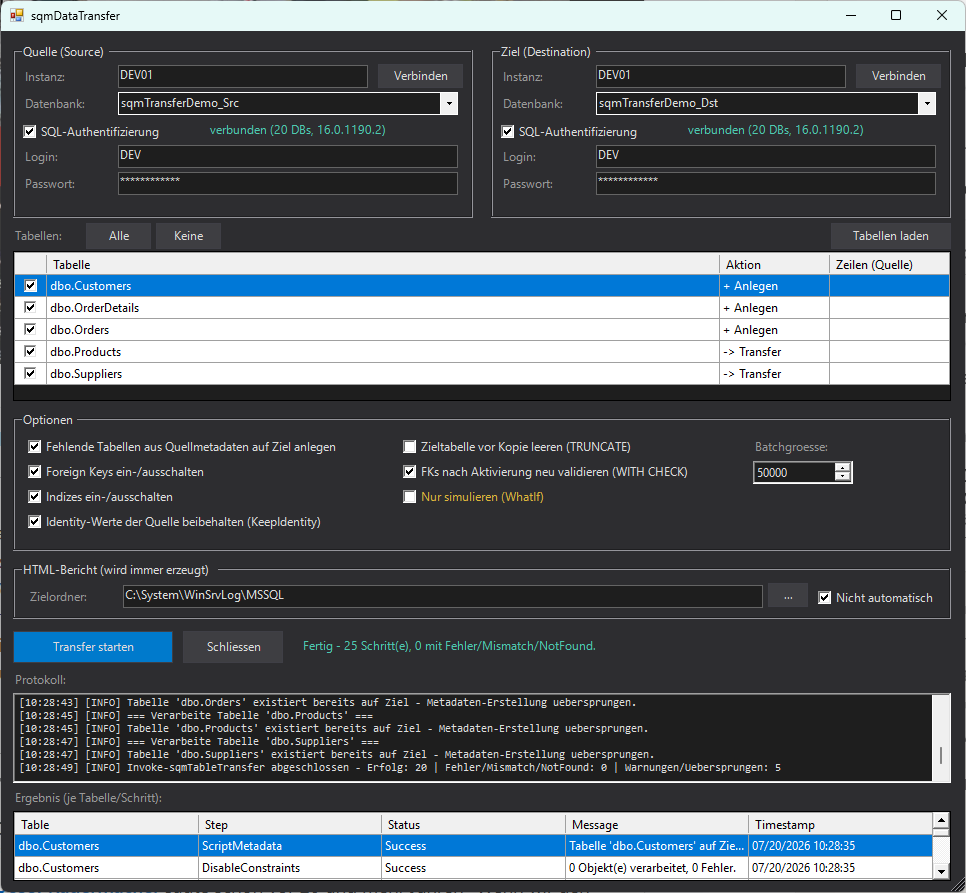
Show-sqmTableTransferGui window connected to a source and a destination SQL Server instance, with five tables loaded: dbo.Customers, dbo.OrderDetails, and dbo.Orders marked '+ Anlegen' because they don't exist yet on the target, dbo.Products and dbo.Suppliers marked '-> Transfer' because they already do. The options panel has metadata scripting, foreign key and index handling, and KeepIdentity all enabled. The status bar reads 'Fertig - 25 Schritt(e), 0 mit Fehler/Mismatch/NotFound', with the protocol log and the per-table/per-step result grid populated below it.
The GUI after a real run: three tables scripted and created from source metadata, two already present and just transferred, all 25 steps (5 tables × 5 steps) succeeded.

Resuming an interrupted run

A run over hundreds of tables can get killed halfway — a crashed session, a rebooted box overnight — and the HTML report is only written once the run finishes, so there's normally no record of what actually made it. -SkipCompleted runs Compare-sqmTableRowCount against every requested table up front and skips any where source and target row counts already match, so re-submitting the full table list only touches what's still outstanding. No separate bookkeeping of "which tables finished" — completeness is re-derived from the data itself, every time. Available on Invoke-sqmTableTransfer and as a checkbox in the GUI's options panel.

Metadata scripting

The part that usually breaks a hand-written CREATE TABLE.

With -ScriptMetadata, the module doesn't just script the table — it walks the real dependency graph so the CREATE actually succeeds on the target.

SchemaThe destination schema is created automatically if it doesn't exist
DependenciesUser-defined types, sequences, and FK-referenced tables the table depends on are scripted automatically too (SMO WithDependencies)
Partitioned tablesStill fully scripted and transferred — but the physical partitioning itself (partition function/scheme, per-partition filegroups) is stripped, since there's no way to know whether an equivalent scheme exists on the target. Lands as a normal table on PRIMARY instead of failing with a missing-partition-scheme error. Reported as a warning.
CLR user-defined typesScripted, but flagged as a warning — the assembly itself has to be deployed on the target manually
Version targetingThe destination's actual SQL Server version is auto-detected and passed to SMO as TargetServerVersion, so scripting from a newer source (e.g. 2022) down to an older target (e.g. 2019) produces syntax the target can run
For the tables that don't fit in one copy

Hundreds of millions of rows, no primary key, resumable anyway.

Invoke-sqmTableTransfer is all-or-nothing: if a copy of a 300-million-row table is interrupted an hour in, there's normally no reliable way to know which rows already made it across without a key to anti-join on — and no way to resume without re-copying everything. Invoke-sqmChunkedTableTransfer splits the table by a discriminating column (typically a reporting or snapshot date) and transfers it one distinct value at a time instead.

ResumabilityBefore each chunk, source and destination row counts for just that value are compared (COUNT_BIG(*) WHERE [column] = value). A chunk that already matches is skipped — a re-run after a partial failure only touches what's left, with no primary/unique key required anywhere on the table.
Interrupted mid-chunkIf a chunk is killed mid-copy (not between chunks), whatever leftover rows already landed for that one chunk are deleted before it's retried — so a retry can never double up rows, even without a key to prevent duplicates.
Constraint handlingForeign keys, indexes, and triggers are disabled once for the whole chunked run and rebuilt once at the end — not per chunk. Rebuilding an index is a whole-table operation regardless of the chunk size, so doing it per chunk instead of once is the difference between minutes and hours on a large table.
Column-safe by constructionEach chunk's SELECT is bulk-copied with an explicit name-based column mapping (Invoke-sqmDirectBulkCopy), immune to column order or computed columns on either side — and independent of which dbatools version happens to be installed.
Cheap verificationThe final consolidated row-count comparison reads SQL Server's own partition metadata instead of scanning — accurate once the run has actually finished, with no COUNT(*) cost at any table size.

A plain Invoke-sqmTableTransfer call on a table above a configurable row-count threshold (default 10 million, Set-sqmTransferConfig -LargeTableRowThreshold) warns instead of silently doing the all-or-nothing copy — with a ready-to-paste Invoke-sqmChunkedTableTransfer command, including a suggested -ChunkColumn picked from the table's date-typed columns by naming convention. The GUI runs the same check before a transfer starts, since the GUI itself has no chunked path.

Reference

Fifteen functions — two orchestrators, thirteen building blocks.

FunctionPurpose
Invoke-sqmTableTransferMain entry point — orchestrates the full five-step sequence for one or more tables
Invoke-sqmChunkedTableTransferFor huge tables without a primary key — splits by a column and transfers/resumes one chunk at a time
Export-sqmTableSchemaScripts table DDL from a source instance (SMO Scripter)
New-sqmTableFromScriptExecutes scripted DDL batches against a target instance
Copy-sqmTableSchemaConvenience wrapper: export + create in one call
Disable-sqmTableConstraintsDisables FKs / non-clustered indexes / triggers on a table
Enable-sqmTableConstraintsRe-enables (rebuilds) previously disabled FKs / indexes / triggers — re-detects state, nothing to pass in
Copy-sqmTableDataBulk-copies table data (name-based column mapping, dbatools-version independent)
Sync-sqmTableDataSyncs a table's actual insert/update/delete delta via a staging table, instead of a full re-copy
Compare-sqmTableRowCountCompares row counts source vs. target for one or more named tables
Compare-sqmDatabaseRowCountCompares row counts for every table between two databases at once — no table list required
Export-sqmTransferReportBuilds the per-run HTML summary/row-count report
Export-sqmDatabaseComparisonReportBuilds the consolidated database-wide comparison report
Show-sqmTableTransferGuiWinForms GUI for the whole workflow
Get-sqmTransferConfig / Set-sqmTransferConfigModule configuration (log path, batch size, large-table threshold, etc.)

Clustered indexes are never disabled — doing so blocks table access entirely — only non-clustered indexes are touched. Foreign keys and triggers are disabled/enabled individually by name, leaving CHECK/DEFAULT constraints untouched.

Quick start

Install, then one call — or the GUI.

# Installation - auto-detects AllUsers (if Admin) or CurrentUser
Install.cmd

# Transfer two tables, scripting metadata and truncating the target first
Invoke-sqmTableTransfer -Source SQL01 -SourceDatabase Sales -Destination SQL02 -DestinationDatabase Sales -Table 'dbo.Orders', 'dbo.Customers' -ScriptMetadata -Truncate -Confirm:$false

# Resume an interrupted run over the same table list - already-matching tables are skipped
Invoke-sqmTableTransfer -Source SQL01 -SourceDatabase Sales -Destination SQL02 -DestinationDatabase Sales -Table $allTables -ScriptMetadata -SkipCompleted -Confirm:$false

# A 300M-row table with no primary key, split by a reporting-date column
Invoke-sqmChunkedTableTransfer -Source SQL01 -SourceDatabase Sales -Destination SQL02 -DestinationDatabase Sales -Table dbo.Ergebnis_agg -ChunkColumn Dat_ReportingDate -Confirm:$false

# Or via GUI
Show-sqmTableTransferGui

Configuration is persisted separately from sqmSQLTool (%APPDATA%\SQLDataTransfer\config.json) so both modules can be imported side by side without interfering, but LogPath/OutputPath default to the same location sqmSQLTool uses.

Next steps

Move your first table today.

Built on dbatools — if it's already on the box, sqmDataTransfer is one Import-Module away.