powershelldba.de · Uwe Janke
REF: PSDB-SRG-2026 SCOPE: robocopy, Windows 11 24H2 / Server 2025 STATUS: v0.1.0.0
Module

robocopy with every option, checked before it deletes anything.

sqmRobocopyGui is a PowerShell module with a WinForms GUI for robocopy. Pick source and target with the Explorer folder dialog or drag them in, tick the options you need, each with its help text, and the finished command line appears immediately, validated live against the mistakes that make robocopy fail or delete more than intended. Then run it right there: dry run with /L first, live log, progress and the exit code in plain words. Or take it away as a batch file, a PowerShell script or a scheduled task. No dependencies beyond robocopy itself.

Why this exists

One trailing backslash, one wrong target, one locked file.

robocopy is the tool for large copies, mirrors and file server migrations, and it has close to a hundred switches with their own syntax. The classic failures are small: "D:\Target\" in quotes, where the backslash escapes the quote and robocopy reports an invalid parameter; /MIR pointed at the wrong folder; no /R, so a single locked file is retried a million times, 30 seconds apart. sqmRobocopyGui catches those while you click.

By handWith sqmRobocopyGui
Paths typed or pasted, quotes and trailing backslashes by trial and errorExplorer folder dialog, history, drag and drop; directories always written without a trailing backslash
robocopy /? in a second window to look up /DCOPY, /XJD or /MAXLADEvery option in its category with short help in the row and the full text below
/MIR on the wrong target, noticed when the files are goneDestructive options in orange, a hint in the list, and a confirmation that says what will be deleted
Batch file that reports exit code 1 as an errorBatch and PowerShell output with exit code handling: 0 to 7 success, 8 and above error
Scheduled task clicked together in the Task Scheduler UIReady Register-ScheduledTask script, or created directly after a confirmation
Requirements

What it needs.

PowerShellWindows PowerShell 5.1 or PowerShell 7 on Windows (the GUI is WinForms), both verified
ModulesNone. robocopy.exe is part of every Windows version
robocopyOptions as of Windows 11 24H2 and Windows Server 2025. Newer switches such as /COMPRESS, /SPARSE or /IoRate are not available on older Windows versions
RightsNormal user rights for normal copies. /B, /ZB, /COPYALL and owner or auditing information need an elevated GUI, which the title bar shows
LanguageThe user interface and the handbook are German
The GUI

Paths on top, options on the left, command and live log on the right.

Show-sqmRobocopyGui uses the Visual Studio dark theme of the other powershelldba.de tools. Only options you actually set end up in the command; everything else stays at robocopy's default.

  1. Source, target, filesExplorer folder dialog with address bar and quick access, also under PowerShell 5.1 where WinForms only offers the old tree dialog. History of the last 15 paths, drag and drop from Explorer, swap, open in Explorer. A status per path (exists, will be created, not found, no answer) is checked with a timeout, so a dead share never freezes the window.
  2. 95 options in 8 categoriesCopy, file info and attributes, delete and move, file selection, retry, throttling and schedule, logging, job files. Check boxes, letter boxes for /COPY and attribute flags, optional values for /MT, file and folder pickers for /XF, /XD and the log file. Mutually exclusive options deselect each other.
  3. PresetsCopy folder, mirror, add new files only, move, server migration with ACLs, NAS or Linux share, large files, distribute SQL backups, slow WAN link, folder structure only, dry run.
  4. Command, log and findingsThe command is rebuilt on every change with syntax highlighting. A run switches to the live log with progress; the list at the bottom shows errors and hints.
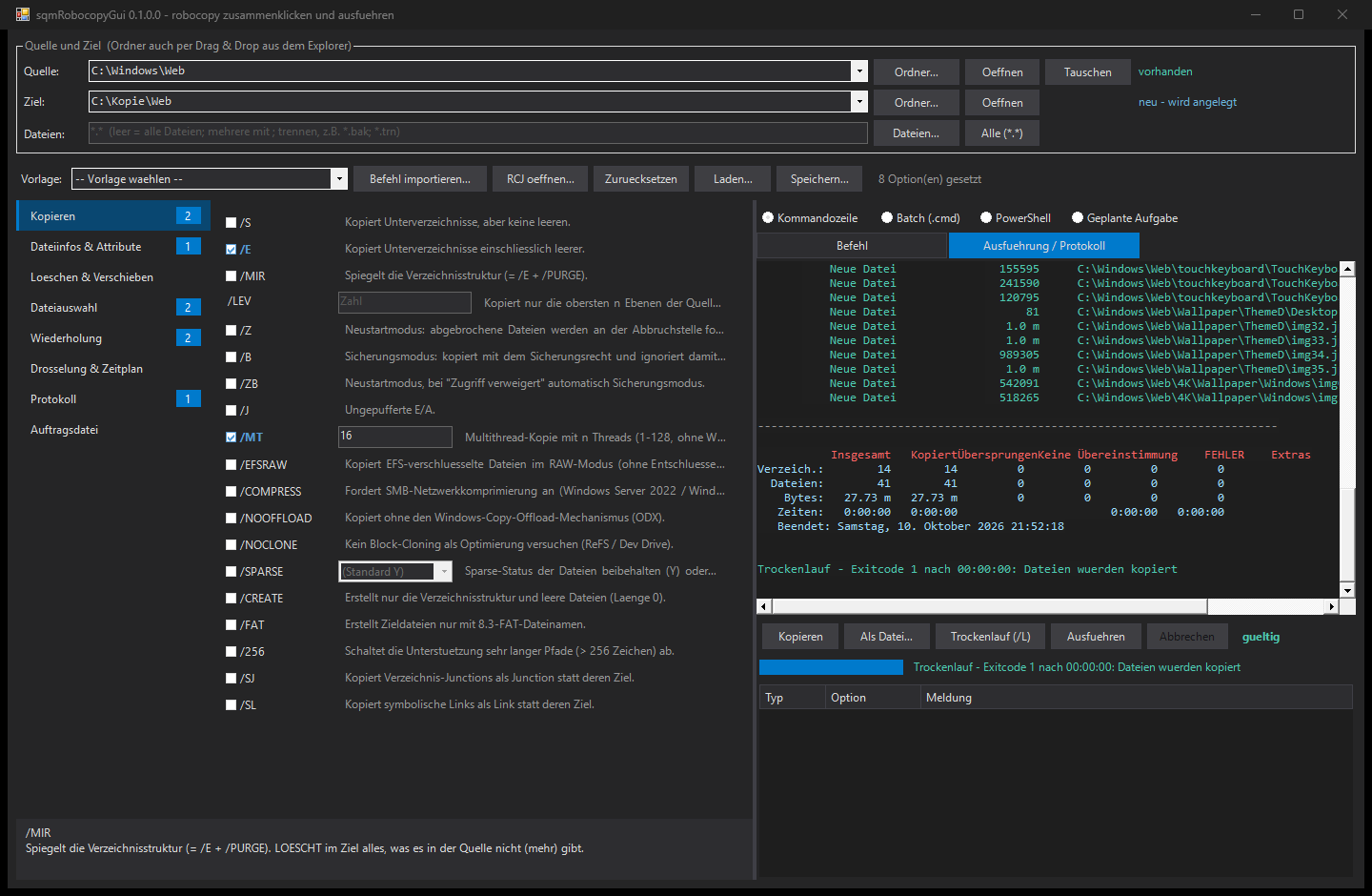
sqmRobocopyGui in the dark Visual Studio theme. Top: source C:\Windows\Web marked as existing, target C:\Kopie\Web marked as will be created. Left: category list with badges, the Copy category with /E and /MT:16 set and a short help text in every row. Right: the execution log of a dry run with new files in green, the summary table and the result line exit code 1, files would be copied.
A dry run with /E /MT:16: the live log lists every file robocopy would copy, the result line explains the exit code.
Validation

Errors robocopy would throw, and runs you would regret.

Errors mean robocopy would refuse the call or the combination contradicts itself. Hints flag what is allowed but risky. Double-click on a line jumps to the option. Before a real run the GUI also checks that the source is reachable and the target drive or share exists.

AreaExamples
PathsSource or target missing, source equals target, wildcards in a directory, source inside the target with /MIR or /PURGE, target inside the source
Exclusive groups/S /E /MIR, /Z /B /ZB, /COPY /SEC /COPYALL /NOCOPY, /MOV /MOVE, the four log variants
Values/MT 1 to 128, /MAX and /MIN in bytes only, /MIN above /MAX, dates for /MAXAGE, /RH time window, allowed letters for /COPY and attribute flags
Combinations/MT with /IPG or /EFSRAW, /TEE without a log file, /XX without /MIR, log file without /NP
Risk/MIR, /PURGE, /MOV, /MOVE delete data, /MIR on a drive or share root, /MON and /MOT never end, /REG changes the defaults, no /R, options that need admin rights
Output

Four formats, one source of truth.

robocopy D:\Daten\Projekte "\\nas01\backup\Projekte" /MIR /MT:16 /DCOPY:DAT /XF *.tmp Thumbs.db /XD ~snapshot /R:3 /W:5 /LOG:"C:\Logs\projekte.log" /NP
FormatUse
Command lineOne line, quotes only where needed, directories without a trailing backslash
Batch (.cmd)chcp 65001 for umlauts in paths, % escaped as %%, exit code 0 to 7 returns 0, 8 and above returns the robocopy error
PowerShellArgument array, & robocopy.exe @robocopyArgs, throws from exit code 8
Scheduled taskRegister-ScheduledTask script: once, daily, weekly or interval, as SYSTEM or the current user, catches up missed runs, no parallel instance. Stops with a message if the task exists
Run it

Dry run first, then the real thing, with a live log.

robocopy runs in the background; the window stays responsive and shows the output as it arrives.

  1. Dry run (F5)Adds /L: robocopy lists what it would copy, delete or skip, and changes nothing.
  2. Run (Ctrl+F5)After a confirmation. With /MIR, /PURGE, /MOV or /MOVE it names the folder in which files will be deleted, and "No" is the default button.
  3. Live logNew files in green, older or changed in blue, *EXTRA files that a mirror deletes in orange, errors in red. Progress bar and name of the current file, cancel button.
  4. ResultThe exit code as text, for example exit code 3: files copied, extra files in the target. With a log file the GUI adds /TEE for this run, so the output still appears in the window.
Scripting without the GUI

The same generator for deployment scripts.

FunctionPurpose
Show-sqmRobocopyGuiThe WinForms GUI, optionally prefilled with -Source, -Destination or an existing -CommandLine
New-sqmRobocopyCommandCommand line, batch, PowerShell, scheduled task script or raw argument list from a hashtable
Test-sqmRobocopyParameterOffline rule check, optionally with -CheckPath, returns errors and warnings per option
ConvertFrom-sqmRobocopyCommandExisting command line (cmd, batch, PowerShell) or .RCJ job file back into a hashtable
ConvertFrom-sqmRobocopyExitCodeThe exit code bit mask as success flag and text
Quick start

Install, then the GUI, or one call.

# Installation - AllUsers when elevated, otherwise CurrentUser
Install.cmd

# GUI (or double-click Start-sqmRobocopyGui.cmd without installing)
Show-sqmRobocopyGui -Source D:\Daten -Destination \\nas01\backup\Daten

# Mirror as a nightly scheduled task
$p = @{ Source = 'D:\Daten'; Destination = '\\nas01\backup\Daten'; MIR = $true; MT = 16; R = 3; W = 5; LOG = 'C:\Logs\daten.log'; NP = $true }
Test-sqmRobocopyParameter -Parameter $p -CheckPath
New-sqmRobocopyCommand -Parameter $p -Format ScheduledTask -ScheduleType Daily -ScheduleTime 22:00

The last sources and targets are remembered in %APPDATA%\sqmRobocopyGui\config.json. Tests\Test-sqmRobocopyGui.ps1 lets robocopy parse every option itself, runs all output formats against a folder with spaces, an umlaut and % in its name, and drives the GUI including dry run, real run and cancel.

Next steps

Your first mirror in a minute, dry run included.

No dependencies to install: unzip, double-click Start-sqmRobocopyGui.cmd, drag two folders in.