sqmMergeGenerator is a PowerShell module with a WinForms GUI that writes T-SQL MERGE statements for you. Pick a server, a source and a target table, map the columns the way the SSIS column mapping editor does, tick the join keys, and the statement is regenerated on every click. It produces a NULL-safe upsert (SCD type 1) or a full slowly changing dimension type 2 load with a change type per column. It has no dbatools or other module dependency and never runs anything unless you press Execute and confirm.
The column list appears in four clauses that must stay in sync. S.Name <> T.Name silently misses changes to and from NULL. Without HOLDLOCK two parallel loads insert the same key twice. A duplicate key in the source either fails with error 8672 or, in a type 2 dimension, quietly writes wrong history. sqmMergeGenerator reads the metadata of both tables and writes all of it.
| By hand | With sqmMergeGenerator |
|---|---|
| Column lists typed four times, one forgotten column per release | Columns auto-mapped by name, every clause generated from the same mapping |
WHEN MATCHED THEN UPDATE rewrites every row on every run | EXISTS (SELECT S.. EXCEPT SELECT T..): NULL-safe, a re-run with unchanged data touches 0 rows |
| Duplicate source keys found by error 8672 at 3 a.m. | THROW 50001 with a clear message before anything changes |
| SCD type 2 copied from a blog post that breaks on triggers and foreign keys | OUTPUT INTO #temp plus a plain INSERT, one transaction, works with triggers and FK-referenced dimensions |
xml or geography column breaks the comparison | Non-comparable types cast automatically for change detection |
| Identity column mapped, statement fails | SET IDENTITY_INSERT wrapped automatically, column left out of UPDATE SET |
| PowerShell | Windows PowerShell 5.1 or PowerShell 7 on Windows (the GUI is WinForms), both verified |
| Modules | None. Talks to SQL Server through System.Data.SqlClient from the .NET Framework, so it runs on locked-down servers without PSGallery access |
| SQL Server | 2012 or later (MERGE, THROW), tested against SQL Server 2022 |
| Rights to generate | Read access to the catalog views of the databases involved |
| Rights to execute | SELECT on the source, INSERT/UPDATE/DELETE on the target |
Show-sqmMergeGeneratorGui connects with Windows or SQL authentication, then offers database and table per combo box for both sides. Source and target may sit in different databases on the same instance; every name is generated three-part.
[PK] marker. Tick what to use. Views are offered as a source.rowversion and GENERATED ALWAYS columns are never offered as a target..sql, check its syntax (compiled with SET NOEXEC ON, names resolved, nothing executed) or execute it after a confirmation.
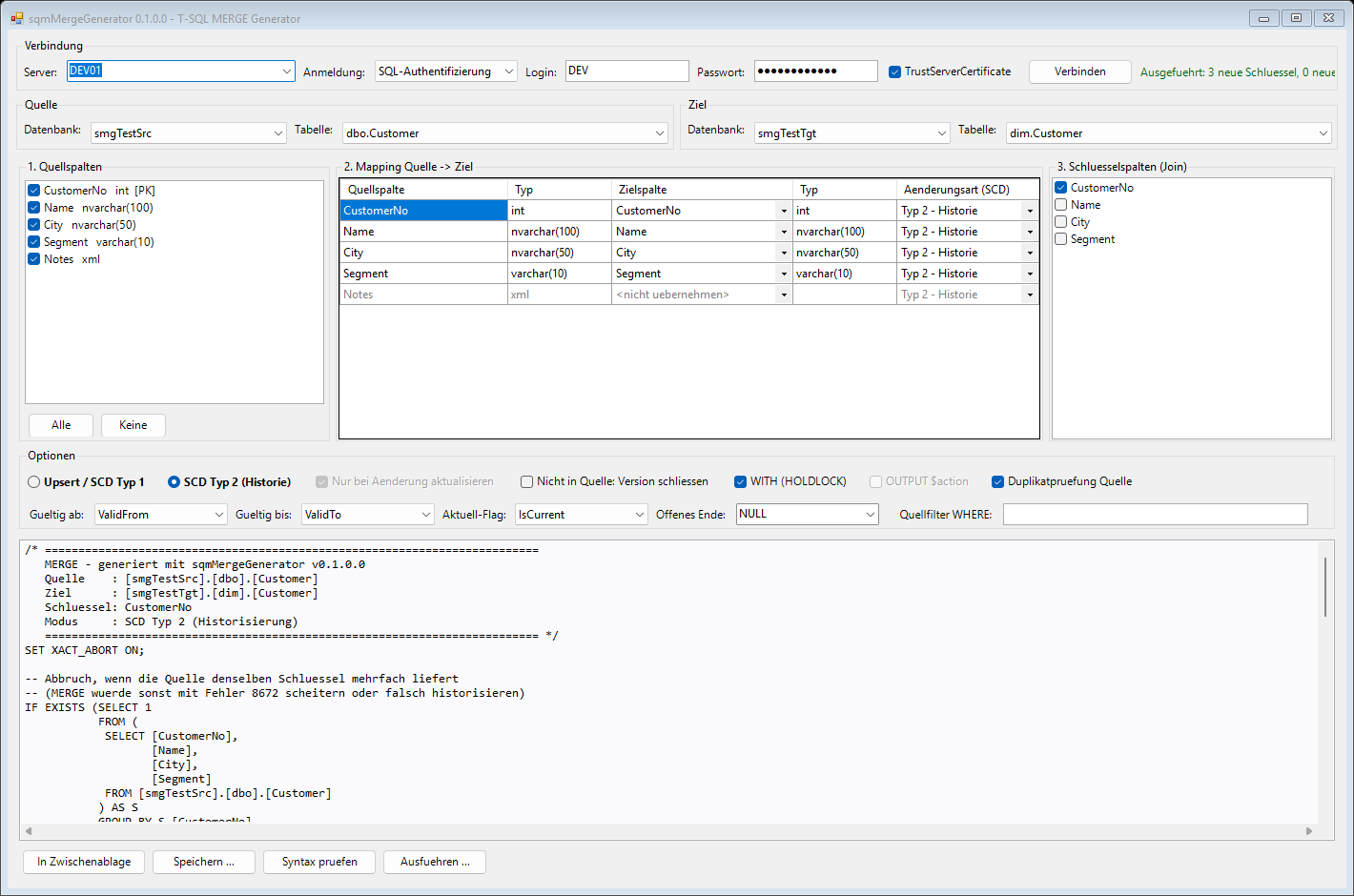
ValidFrom, ValidTo and IsCurrent, so the GUI switched to SCD type 2 on its own and preselected those columns. The xml column is left unmapped.MERGE INTO [DWH].[dbo].[Customer] WITH (HOLDLOCK) AS T USING ( SELECT [CustomerNo], [Name], [City] FROM [Staging].[dbo].[Customer] ) AS S ON T.[CustomerNo] = S.[CustomerNo] WHEN MATCHED AND EXISTS (SELECT S.[Name], S.[City] EXCEPT SELECT T.[Name], T.[City]) THEN -- NULL-safe: only real changes UPDATE SET T.[Name] = S.[Name], T.[City] = S.[City] WHEN NOT MATCHED BY TARGET THEN INSERT ([CustomerNo], [Name], [City]) VALUES (S.[CustomerNo], S.[Name], S.[City]) WHEN NOT MATCHED BY SOURCE THEN -- optional DELETE OUTPUT $action AS MergeAction, COALESCE(inserted.[CustomerNo], deleted.[CustomerNo]) AS [CustomerNo];
Unchanged rows are not touched at all: no log volume, no trigger work, no new rowversion. Columns marked Fixed are only written on insert.
A target with a current flag and/or a valid-to column (several German and English naming patterns are recognised) switches the GUI into type 2 mode. The key is the business key, the surrogate key is assigned by the table.
| Change type | Upsert / SCD 1 | SCD type 2 |
|---|---|---|
| Type 2: history | overwrite | A change closes the current version and inserts a new one |
| Type 1: overwrite | overwrite | Overwritten in all versions of the key, no new version |
| Fixed | insert only | Never updated, only set on the first insert |
THROW 50001 if the source delivers a business key twice, before anything changes.UPDATE across every version of the key, only where the value really differs.#smgMergeOutput via OUTPUT INTO.INSERT from the temp table for every closed key that is still in the source.The well-known INSERT INTO dim SELECT ... FROM (MERGE ... OUTPUT ...) is composable DML, and SQL Server rejects it as soon as the dimension has a trigger or is referenced by a foreign key from a fact table. That is most real dimensions. sqmMergeGenerator uses OUTPUT INTO a temp table followed by an ordinary INSERT, so both cases work. Both are part of the live test.
| Option | Upsert / SCD 1 | SCD type 2 |
|---|---|---|
| Update only on real change | WHEN MATCHED AND EXISTS (... EXCEPT ...) | always |
| Not in source | WHEN NOT MATCHED BY SOURCE THEN DELETE | close the current version |
WITH (HOLDLOCK) | yes, default on | yes, default on |
OUTPUT $action | key and action per row | summary row instead |
| Duplicate key check | THROW 50001 before the MERGE | same |
| Source filter | WHERE inside the USING subquery | same |
| Open end | n/a | NULL or a fixed date such as '9999-12-31' |
xml, text, ntext, image and CLR types (geography, geometry, hierarchyid) can't be compared by EXCEPT directly; they are cast for the comparison and assigned unchanged.
New-sqmMergeStatement needs no database connection. Feed it the mapping and keys, get the statement back as a string.
| Function | Purpose |
|---|---|
| Show-sqmMergeGeneratorGui | The WinForms GUI, optionally connected right away with -SqlInstance / -SqlCredential |
| New-sqmMergeStatement | Generates the upsert or SCD type 2 statement from source, target, mapping and keys, no connection needed |
| Get-sqmMergeDatabase | Databases of an instance the login can read |
| Get-sqmMergeTable | Tables, optionally views, of a database |
| Get-sqmMergeColumn | Columns with type, PK, identity, computed, rowversion, GENERATED ALWAYS, CLR flag and IsWritable |
# Installation - AllUsers when elevated, otherwise CurrentUser Install.cmd # GUI (or double-click Start-sqmMergeGenerator.cmd without installing) Show-sqmMergeGeneratorGui -SqlInstance SQL01 # Upsert from a hashtable mapping source = target New-sqmMergeStatement -SourceDatabase Staging -SourceTable Customer -TargetDatabase DWH -TargetTable Customer ` -ColumnMapping @{ CustomerNo = 'CustomerNo'; Name = 'Name'; City = 'City' } -KeyColumns CustomerNo -HoldLock # SCD type 2 with a change type per column $map = @( @{ SourceColumn = 'CustomerNo'; TargetColumn = 'CustomerNo' } @{ SourceColumn = 'Name'; TargetColumn = 'Name'; ChangeType = 'Type1' } @{ SourceColumn = 'City'; TargetColumn = 'City'; ChangeType = 'Type2' } @{ SourceColumn = 'Segment'; TargetColumn = 'Segment'; ChangeType = 'Fixed' } ) New-sqmMergeStatement -SourceDatabase Staging -SourceTable Customer -TargetDatabase DWH -TargetSchema dim -TargetTable Customer ` -ColumnMapping $map -KeyColumns CustomerNo -Mode Scd2 -DuplicateKeyCheck -HoldLock ` -ValidFromColumn ValidFrom -ValidToColumn ValidTo -CurrentFlagColumn IsCurrent
The last servers and the login name are remembered in %APPDATA%\sqmMergeGenerator\config.json; the password never is. The included live test (Tests\Test-sqmMergeGenerator.ps1, 36 checks) creates two throwaway databases, runs the generated statements against them and drops them again.
No dependencies to install: unzip, double-click Start-sqmMergeGenerator.cmd, connect.
PowerShell source, MIT-licensed. Clone or download the release ZIP and run Install.cmd.
GUI walkthrough, both modes in detail, every option, scripting, test procedure, troubleshooting. Markdown source also on GitHub.
Source on another instance? Copy it into a staging table on the target instance first, then merge.
Audit SSIS packages, compare versions and map data lineage for the loads that feed your dimensions.
Every release, what changed, and why.
Get in touch about the module, a feature, or the wider powershelldba.de toolchain.